
Bringing Competition to Walled Gardens
Third Party Browsers & Web Apps - VERSION 1.0
You can also download the PDF version [9.2MB]
1. Table of Contents
2. Preface
To the Safari/Webkit Team,
To anyone who works on Safari/Webkit who reads this document, the authors would like to note that all criticism of Safari/Webkit is aimed squarely at Apple and Apple's upper management.
We would like to acknowledge your many groundbreaking contributions to the Web over the past two decades.
As people that have dedicated their lives to building browsers we know you care deeply about the open web and may privately disagree with Apple's anti-competitive practices. We also understand that Safari/Webkit’s funding and which features are approved is entirely controlled from above. We understand that building a browser is an enormous, complex undertaking and that it’s not possible to keep up with a modern feature set while making the platform stable without significant investment, despite the hard-work and dedication of each individual.
We also understand that Apple operates under a paranoid air of strict secrecy which can make it difficult for you to engage properly with the development community and that employees can be fired for even mild criticism of the company making it hard for effective change from within. We hope that this document can help start that change.
Our main aim is to ensure open competition so that the Web and Web Apps can compete against the closed proprietary ecosystems. The future of the web is apps, if native can do it, so can the web except with privacy and security built in by design. It is our strong hope that Webkit will meaningfully participate in this future.
Many of us have developed with Safari and Webkit since it first came out and were inspired to build mobile web apps by Steve Job’s 2007 speech with the platform that your team built. The web we use today is built on your legacy.
It is our hope that with this competition Apple will come to realize the great importance of Safari and Webkit to their overall business goals and will provide the resources and funding to make it the best, most private, stable and feature rich browser available.
Thank-you for your hard work and for everything you’ve given us, we hope you will continue to fight for a better open-web.
3. Introduction
The entire future of the consumer application industry is being heavily limited by Apple’s ban of third party browsers. These actions prevent cross-compatibility between devices, and create significant barriers for new market entrants. For businesses and consumers, it greatly increases costs and enables Apple to lock them into their closed ecosystem. This reduces competition for both browsers and applications, and shifts the cycle of investment and funding from an open and free platform to proprietary closed platforms, driving up prices for consumers and developers.
Apple has banned competing Third Party Browsers from their iOS devices (iPhone and iPad) by requiring that all browser vendors use Safari’s WebView (2.5.6 App Store Review Guidelines). Browser vendors are not allowed to ship their browsers which they have spent hundreds of thousands of hours developing and instead are forced to produce a separate browser which is essentially a thin wrapper or skin around the WebKit engine in Apple’s own browser, Safari.
Critically this browser ban prevents the emergence of an open and free universal platform for apps, where developers can build their application once and have it work across all consumer devices, be it desktop, laptop, tablet or phone. Instead it forces companies to create multiple separate applications to run on each platform, significantly raising the cost and complexity of development and maintenance. These costs are in addition to the 15% - 30% tax charged by the App Store. This greater cost is ultimately passed on to consumers in the form of higher fees, more bug prone applications and the applications not being available on all platforms. This then decreases competition with other manufacturers by depriving them of a healthy library of apps. The costs of developing an interoperable application that works identically are pushed so high that only well funded companies can afford it and as a result many useful or otherwise profitable applications never get built.
Apple is preventing the interoperable, standards-based web from becoming a viable alternative to the native proprietary ecosystems on offer from Apple and Google. In the absence of competition, the poor state of Apple’s own browser and integration of Web Apps has the effect of pushing developers and users towards the gated ecosystem of the App Store. Safari and Apple’s WebView frequently suffer simultaneous, critical application breaking bugs which spill into competing iOS browsers because they cannot bring their own engines which might not contain these bugs.
In a clear conflict of interest with third party browsers, Apple receives 15b USD per year for search engine placement in Safari while ensuring other browsers can not effectively compete on iOS, its most popular operating system. Mozilla, a non-profit, produces a browser that consistently bests Apple’s in security and standards conformance with revenues of less than $500 million per year.
A lack of market pressure, combined with alleged systemic underfunding over many years, prevents the web from becoming a viable application platform. The only way for developers to create stable, capable applications is to invest in Apple’s proprietary platform, which it taxes and retains exclusive control over.
Individual companies benefit greatly from locking users in and their competitors out. Apple hides behind claims of extra security and privacy when, in fact, their restrictions deprive the consumer of choice and locks their data and purchases into Apple’s walled garden. This prevents or adds great friction to users moving to competing platforms by hampering interoperability.
Web Apps add an extra layer of security and privacy controls to native application platforms, improving on the operating system’s built-in controls leading to enhanced user safety. If allowed, Web Apps can offer equivalent functionality with greater privacy and security for demanding use-cases that are traditionally the domain of less secure native apps. A free & universal development and distribution platform is what leads to competition and an investment cycle in free and open software that benefits businesses and consumers.
Two key remedies from regulation can serve to restore meaningful competition:
- Reversing Apple’s ban on competing browsers and browser engines
- Compelling full integration and functionality for apps built with open web technology, including on competing browsers
The future of consumer application development depends on these changes.
3.1. This Document
This document outlines the primary issues related to Browsers and Web Apps and the future of consumer application development.
3.2. Open Web Advocacy
Open Web Advocacy is a loose group of software engineers from all over the world, who work for many different companies who have come together to fight for the future of the open web by providing regulators, legislators and policy makers the intricate technical details that they need to understand the major anti-competitive issues in our industry and potential ways to solve them.
It should be noted that all the authors and reviewers of this document are software engineers and not economists, lawyers or regulatory experts. The aim is to explain the current situation, outline the specific problems, how this affects consumers and suggest potential regulatory remedies.
This is a grassroots effort by software engineers as individuals and not on behalf of their employers or any of the browser vendors. We came together with the hope of creating a better world since no major company has been pushing for this change in recent years. The majority of the engineers behind this document have decided to remain anonymous as no individual feels comfortable going up against the world’s most valuable company, particularly one that is so litigious.
We are available to regulators, legislators and policy makers for presentations / Q&A and we can provide expert technical analysis on topics in this area.
For those who would like to help or join us in fighting for a free and open future for the web, please contact us at:
3.3. Definitions
“Third Party Browser” - A web browser developed by a company other than the gatekeeper which includes a layout engine and rendering engine either selected or built by the company.
“Native App” - An app written using a gatekeeper’s proprietary frameworks and APIs which are provided by the operating system. On iOS (Apple’s operating system for iPhone and iPad) these are currently exclusively delivered through Apple’s App Store.
“Web App” - A Web Application, Web App or Progressive Web App (PWA) is an application developed using Web technologies, such as HTML, CSS, JavaScript and WebAssembly. Web Apps use Web Browsers as the “engine” to run the Web App. The capabilities of a Web Apps depends on the level of advancement of the Web Browser that they run on. Web Assembly allows developers to bring existing software, for example game engines or photoshop, and port/convert them so they run on the web or as a web-app.
Web Apps can be made to run offline, can run as smoothly as native apps and can support high performance applications, but this functionality depends on the Web Browser. Web Apps offer more privacy and security than native apps. Web Apps are universal, in that they can be written once and then run on all devices. This is in comparison with native apps that have to be rewritten for each platform that they target.
To the end user a well written Web App should be indistinguishable from a native app.
“WebView Browser” - A web browser that does not include its own engine, and instead uses an engine or an unmodified “WebView” provided by the OS. For example all browsers on iOS other than Safari on iOS are WebView browsers, in that they do not render the website or run the code for the site and instead hand that job onto Safari WebView.
“PWA (Progressive Web App)” - Can be used interchangeably with Web App, although PWA is used to describe modern Web Apps with functionality that is typically associated with native apps rather than websites (i.e. installation on device, Offline Storage, Device API access etc). For the purposes of this document Web App and PWA will be treated identically.
“Gatekeeper” - The company that controls the operating system and the apps that run on that operating system (i.e. Apple with iOS, Google with Android).
“Browser Vendor” - The entity that makes the browser.
4. Effective Competition?
“Businesses that face effective competition dare not raise prices, or cut down on quality standards, for fear of losing customers to their competitors (and so losing money)”
"For the foreseeable future, iOS will be the dominant access pathway, passport, monetizer and platform for not just digital life, but virtual ones. Apple holds this role because it makes best-in-class hardware, offers the best apps, and operates the most lucrative app store.”
iOS Safari faces no effective competition as Apple has banned the engines that differentiate other browsers. Customers have little recourse short of buying another phone.
The development, maintenance and lost opportunity costs of supporting a buggy browser that misses key features are mostly hidden from them. It is hard for consumers to see a missing feature or an entire Web App that didn’t get built (due to poor support in iOS Safari). When they do encounter a bug caused by Safari they are more likely to blame the Web App than the browser. The user may get the impression that the web is buggy, slow and that native apps are better, which then has negative flow on effects for the entire web ecosystem.
Businesses have little recourse as they can not suggest their customers install another real browser (there are none) and they are unwilling to lose more than half their mobile customers (51% in the UK, 66% in Japan, 56% in Australia, 46% in the US). Additionally iOS users tend to be wealthier and spend more making them a higher priority for companies. In the end the majority of large businesses simply throw in the towel and make an iOS Native App and in doing so agree to pay Apple 15-30% of their revenue.
As such, Apple faces little effective competitive pressure to improve the quality of their iOS Safari browser and has incentives to inhibit it from competing with native. Thus Apple’s decade long prohibition on competition for Safari on iOS has a compounding anti-competitive effect as companies sink money into non-interoperable native iOS applications instead of Web Apps.
Even Apple executives appear to be aware only their stranglehold on iOS installation is allowing their 30% tax on revenue, something they can not achieve on Mac OS.
"Neither is on the store because they don't have to be. They can be on Mac and distribute to users without sharing the revenue with us"
— Philip Schiller - Apple Upper Management - On the Mac App Store
5. Apple is Holding Back the Open Web
"Instead, Apple is inhibiting this future Internet. And it does so via tolls, controls, and technologies that not only deny what made and still makes the open web so powerful, but also prevents competition, and prioritize Apple’s own profits."
"Making the web less useful makes apps more useful, from which Apple can take its share; similarly, it is notable that Apple is expanding its own app install product even as it is kneecapping the industry’s."
5.1. Steve Jobs Original Vision for iOS
Steve Jobs’ original vision for third-party apps on iOS was quite different from today’s status quo.
The following is a transcript of a speech he gave announcing Web Apps as the platform for third-party iOS developers, including his thoughts on security, deployment, and criticisms of other distribution models (emphasis added):
”Now, what about developers?
We have been trying to come up with a solution to expand the capabilities of iPhone by allowing developers to write great apps for it, and yet keep the iPhone reliable and secure. And we’ve come up with a very sweet solution.
Let me tell you about it.
So, we’ve got an innovative new way to create applications for mobile devices, really innovative, and it’s all based on the fact that iPhone has the full Safari inside. The full Safari engine is inside of iPhone and it gives us tremendous capability, more than there’s ever been in a mobile device to this date, and so you can write amazing Web 2.0 and Ajax apps that look exactly and behave exactly like apps on the iPhone!
And these apps can integrate perfectly with iPhone services: they can make a call, they can send an email, they can look up a location on Google Maps. After you write them, you have instant distribution.
You don’t have to worry about distribution: just put them on your internet server. And they’re really easy to update: just change the code on your own server, rather than having to go through this really complex update process.
They’re secured with the same kind of security you’d use for transactions with Amazon, or a bank, and they run securely on the iPhone so they don’t compromise its reliability or security.
And guess what: there’s no SDK! You’ve got everything you need, if you know how to write apps using the most modern web standards, to write amazing apps for the iPhone today.
You can go live on June 29.”
— Steve Jobs - Original Announcement of Third-Party Apps (2007)
Apple invented mobile Web Apps, but ultimately decided on a proprietary closed ecosystem.
5.2. Apple Claims that Web Apps are a Viable Alternative to the App Store
Web Apps are applications installed from the browser that utilize the user's browser to give users an experience on par with Native apps. They are interoperable between operating systems, have a very tight security/privacy model and are capable of amazing things.
Apple’s original vision for applications on iOS was Web Apps, and today they still claim Web Apps are a viable alternative to the App Store. Apple CEO Tim Cook made a similar claim last year in Congressional testimony when he suggested the web offers a viable alternative distribution channel to the iOS App Store. They have also claimed this during a court case in Australia with Epic.
Despite this Web Apps are not currently a viable competitor to the iOS App Store for three reasons:
- Browser Ban
Apple’s Safari is the only browser on iOS as all other browsers have been effectively banned - Missing Features
Apple has refused to implement key features (some for more than 10 years) that would allow Web Apps to compete with the App Store, both in iOS and in Safari. - Bugs
Apple's iOS Safari is significantly more buggy and unstable than its rivals making it unviable as a platform for applications.
5.3. Apple has effectively banned all Third-Party browsers
The Apple App Store Review Guidelines contain the following rule:
“2.5.6 Apps that browse the web must use the appropriate WebKit framework and WebKit Javascript.”
Webkit is the engine that powers Safari and several Linux browsers. Apple also produces a “WebKit framework” that is included in its operating systems (macOS, iOS, iPadOS, tvOS, and watchOS).
In practice, Section 2.5.6 is a requirement that iOS and iPadOS browsers from Google, Microsoft, Mozilla, Samsung, Opera cannot use their own engines the way they do everywhere else. These engines take hundreds of thousands of engineer hours to develop, and are excluded from Apple’s most successful consumer operating systems. Competing browser vendors are only allowed to produce shells around a very specific, unaltered version of Safari’s WebView; a component whose features Apple dictates.
All rival iOS browsers in the App Store are essentially Safari under the hood. This Browser Ban is unique to Apple’s iOS.
"Apple has a browser monopoly on iOS, which is something Microsoft was never able to achieve with IE"
“All of this is compounded by yet another Apple policy: no third-party browser engines. You can install apps like Chrome, Firefox, Brave, DuckDuckGo, and others on the iPhone — but fundamentally they’re all just skins on top of Apple’s WebKit engine. That means that Apple’s decisions on what web features to support on Safari are final. If Apple were to find a way to be comfortable letting competing web browsers run their own browser engines, a lot of this tension would dissipate.”
“So it’s not just one browser that falls behind. It’s all browsers on iOS. The whole web on iOS falls behind. And iOS has become so important that the entire web platform is being held back as a result.”
"because WebKit has literally zero competition on iOS, because Apple doesn’t allow competition, the incentive to make Safari better is much lighter than it could (should) be."
"What Gruber conveniently failed to mention is that Apple’s banning of third-party browser engines on iOS is repressing innovation in web apps."
No other major operating system imposes a ban on integrated third-party browsers (browsers that include their own engines). Microsoft Windows, Android, Linux, and Apple’s own macOS all enable choice of integrated browser. Even Google’s ChromeOS, named after its browser, is more open to competing engines than iOS.
Despite this uniquely anti-competitive situation, Apple has managed to evade regulatory oversight. Browser choice is what drives the technology forward which ultimately results in better, faster, more reliable software for users.
Microsoft’s IE6 was once the dominant browser with a 95% market share1 due to its pre-installation on Windows. Without competition on the Windows platform, browser development remained stagnant for years until Firefox’s market share triggered Microsoft to start investing in browsers once again. At no point did Microsoft ban competing browsers as Apple has done.
1:"Usage share of web browsers - Wikipedia". Accessed 23 Jun. 2021.
5.3.1. Hobbled Competition even within Safari clones
Apple's hobbling of third party browsers doesn't stop at mandating a specific version of Webkit, Apple provides Safari significant unfair advantages.
The major issues include:
Full Screen Video
Safari is allowed to make video full screen, the other “browsers” are prevented from doing so, except on ipad.
It is hard to see the rationale for allowing it on iPad but disabling it on iPhone.Full Screen Games
Canvas, a software component, which is essential for Games can not be made full screen. Apple derives most of their App Store revenue from games.No Web Apps
The other “browsers” can not install Web Apps. Only Safari can.Extensions
Only Safari can use extensions which are used by many users, including to block advertising.Apple Pay
Apple limits the integration of Apple Pay with the other browsers.In-App Browsers
Regardless of the user’s default browser setting, iOS will always force the user to use Safari instead of the user’s choice of browser. An In-App Browser is a browser that you would see inside an application like twitter when you visit a link from inside the application.
5.4. Safari Lags Behind and is Missing Key Features
It’s well known in the web-development industry that Safari is far behind on critical web-features (emphasis added).
“The reason we lost Safari on Windows is the same reason we are losing Safari on Mac. We didn't innovate or enhance Safari. If you want to compete on something across all platforms, it needs to be the best. We had an amazing start on Safari and then stopped innovating. Now, we are starting to work on Safari again but look at Chrome. They put out releases at least every month while we basically do it once a year”
“Apple's Safari lags considerably behind its peers in supporting web features.”
"Apple’s web engine consistently trails others in both compatibility and features, resulting in a large and persistent gap with Apple’s native platform."
"Safari just doesn’t support key features — and Safari’s the only option"
"It’s not just the lack of choice in browser engines on iOS, it’s that WebKit itself is deficient as a browser engine."
5.4.1. Web Platform Tests
The Web Platform Tests Dashboard shows this numerically by showing every failure that only fails in just one browser.
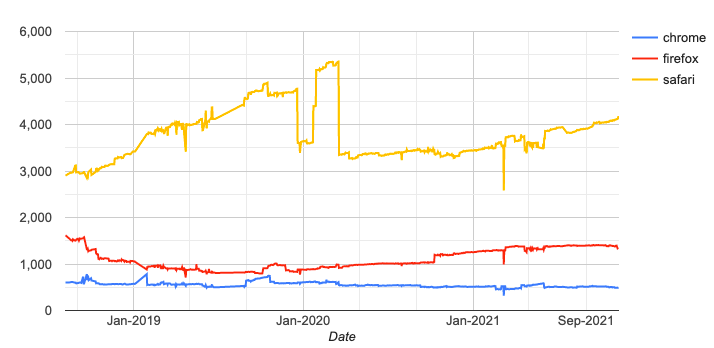
As can be seen as at 10/11/2021, for each of the experimental builds of these browsers:
- 4180 Failures - Safari
- 1346 Failures - Firefox
- 494 Failures - Chrome
Safari is objectively lagging the competition, and this is likely because Apple has no browser competition on the operating system most important to their business, iOS.
The Web Platform Tests Dashboard is a comprehensive test suite built by the developers of browsers themselves, including Mozilla, Google, Apple, Opera, and others. Not every browser supports every feature, and tests may vary in quality, but this is the closest to "ground truth" regarding the fine-grained detail of interoperability for all browsers. The failures listed above are only features that fail in just one browser.
5.4.2. Progressive Web App Feature Detector
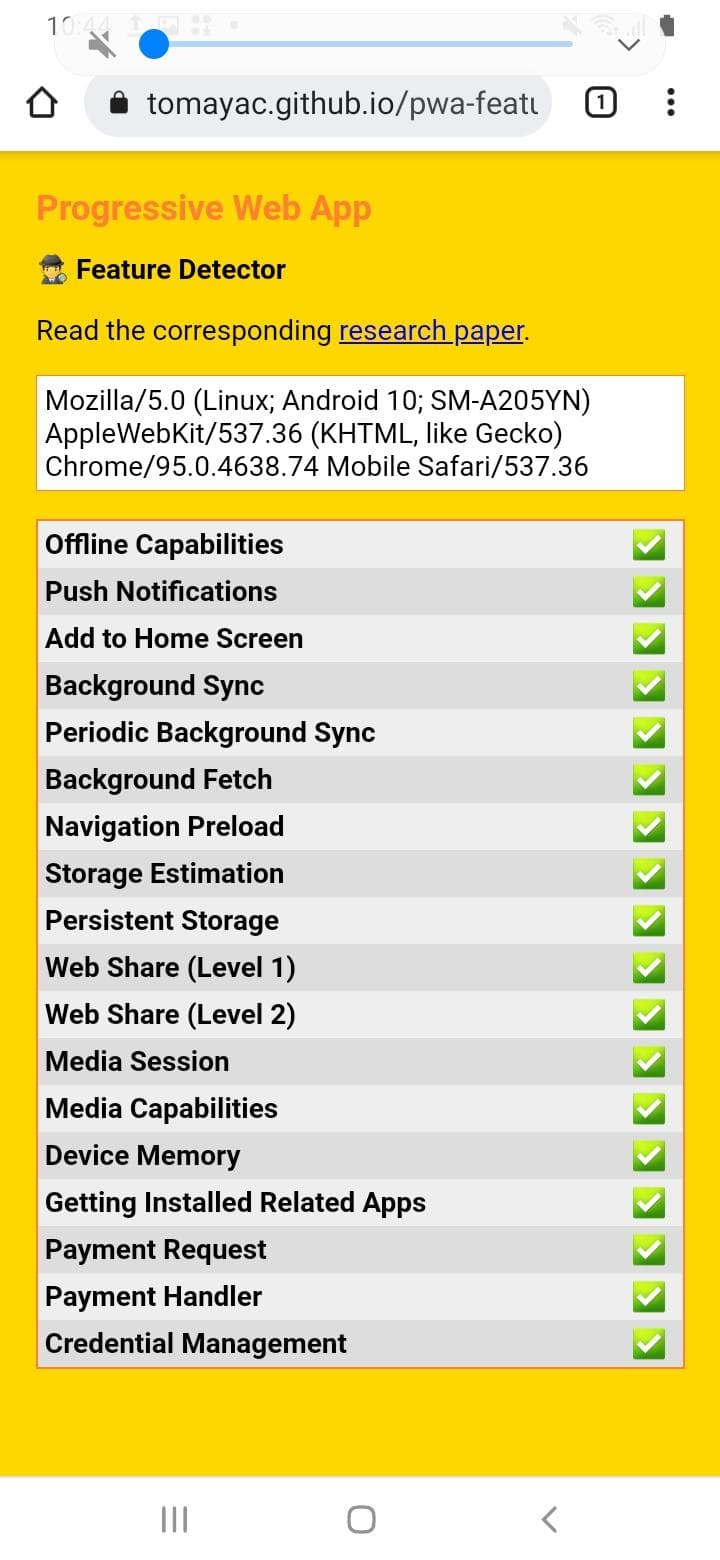
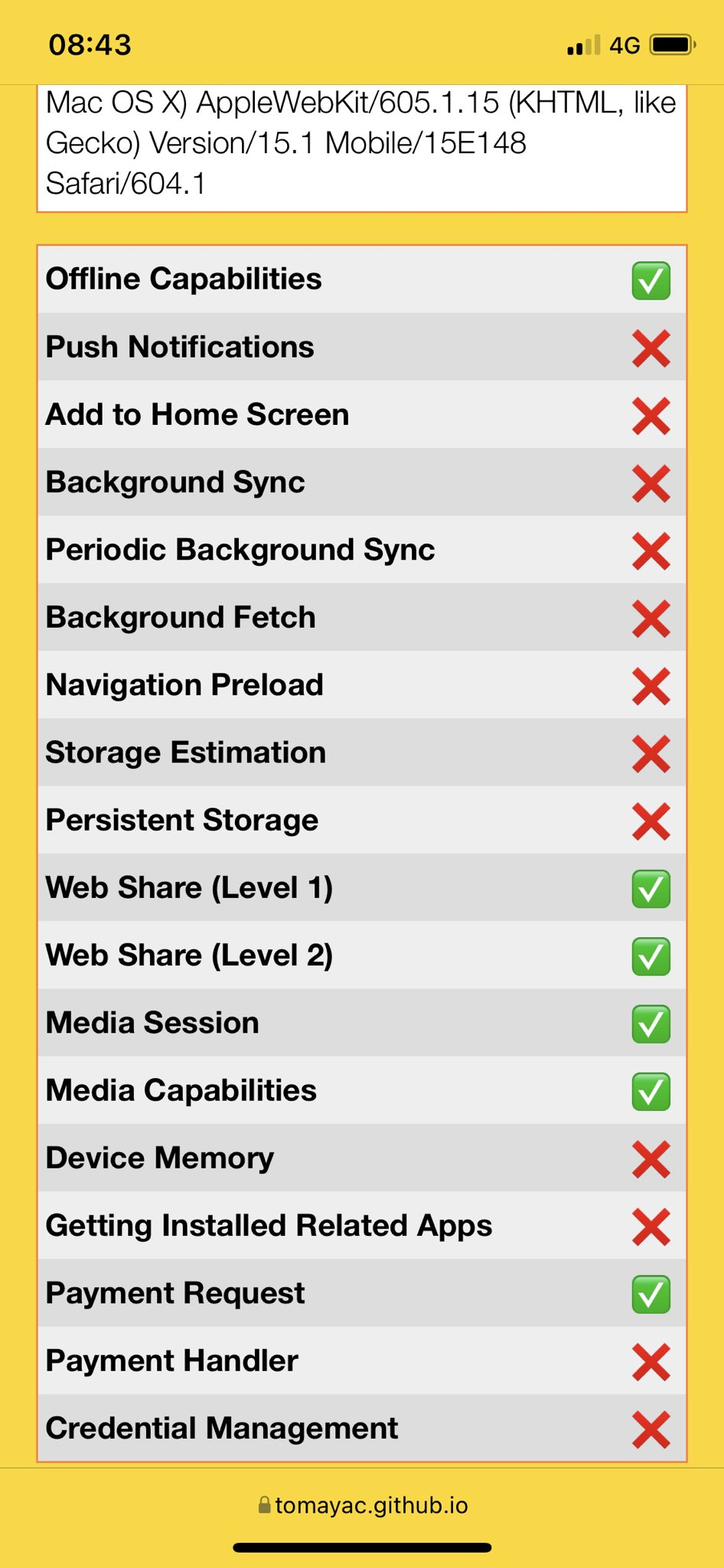
The Progressive Web App Feature Detector is a high-level test that can provide directional understanding for developers attempting to assess the suitability of Web Apps for addressing their needs. It contains a short but important list of features that are used throughout native apps. Below is a comparison showing Chrome 95 running on a Samsung Galaxy S20 on the left, and Safari running on an iPhone X with iOS 15.1 on the right.
5.4.3. Missing Functionality
Safari – or more specifically the WebKit engine that powers it – is well behind the competition.
Some of the most important features that are missing from iOS Safari are:
- General
- Push Notifications
- Navigation Preload
- AV1/AVIF and VP8/VP9/WebP (open Media Codecs)
- Compression Streams
- Keyboard Lock and Keyboard Layout APIs
- Declarative Shadow DOM
- Reporting API
- Permissions API
- Screen Wakelock
- Intersection Observer V2
- Shared Workers and Broadcast Channels
- Background Sync
- Background Fetch API
- Essential Web App APIs
- Web App Install Prompts
- PWA App Shortcuts
- getInstalledRelatedApps()
- Periodic Background Sync
- Web Share Target
- Content Indexing
- Badging
- Device APIs
- Web Bluetooth
- Web NFC
- Web USB
- Web MIDI
- Web Serial
- Web HID
- Shape Detection
- Generic Sensors API
- Gaming and 3D-related APIs
- Fullscreen API for <canvas> and non-<video> elements
- WASM Threads
- Shared Array Buffers
- SIMD
- WebXR
- Offscreen Canvas
The article Progress Delayed is Progress Denied is a detailed look at how far Safari has fallen behind in features.
Not every developer needs every feature listed above but some are the critical missing piece required to build a Web App instead of a Native App. For competition between Web Apps and Native Apps it’s important to compare the functionality of Web Apps with Native Apps and not simply between browsers.
5.4.4. Short Example
To expand on each of these to explain why these missing features are important to developers would be a lengthy undertaking so instead we will highlight just a few and explain why they are essential to allow Web Apps to compete with the App Store. Please note that most of these capabilities or something analogous are possible in Native Applications.
Imagine you were building a social networking App and decided to build it as a Web App instead of as a Native App.
The two key pieces of functionality you would need to compete with the App Store would be being able to notify a user when they have received a new message (Push Notifications) and being able to add unread message count badges to the App Icon (App Badging). Both of these features are missing on iOS for Web Apps despite coming out for Native Apps more than 10 years ago. Multiple browsers support these features across many operating systems, both desktop and mobile whereas iOS Safari does not.
Twitter has built a high-quality Web App for Twitter that you can install on iOS but they still recommend you use the iOS Twitter App, likely due to these critical missing features.
An App Badge showing a count of 29 on iOS in 2011:

Because of these missing features entire categories of apps can either not be built using the web or which ensure that the native app is significantly better.
5.4.5. iOS Web App Installation - A well hidden Safari exclusive
Apple heavily preferences Native Apps while placing strong limitations on Web Apps.
On Android devices, Web Apps are easy to find and install. Firefox / Chrome & Edge all provide functionality that allow developers to make installing Web Apps on Android simple, intuitive and easy.
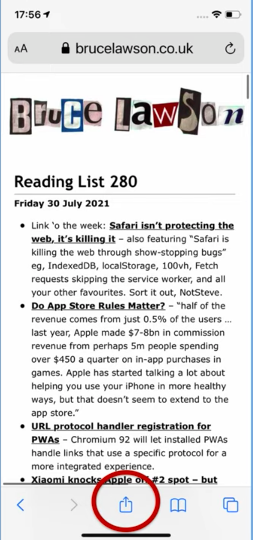
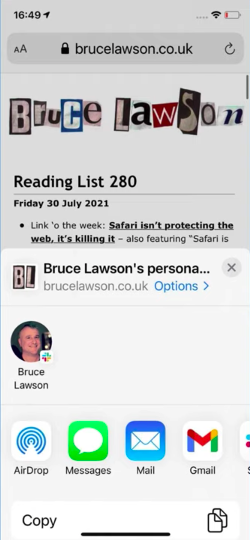
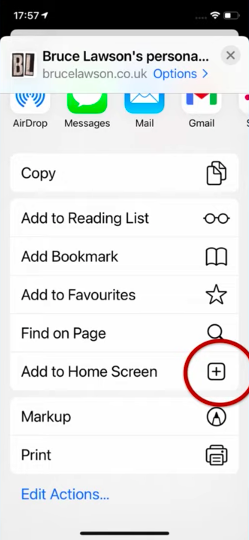
By comparison it can be very difficult to explain to a user how to install a web-app on iOS through Safari, as it is hidden away and requires multiple steps to find. It could be argued that Apple benefits from this as it will drive companies to use native apps. Apple makes it easy to install native apps with Smart App Banners while making it very difficult to install Web Apps.
For the other reskinned/rebranded Safari WebView browsers (Chrome/Edge/Firefox) Apple has blocked them from installing Web Apps. This functionality is exclusive to Safari.
5.4.5.1. Android
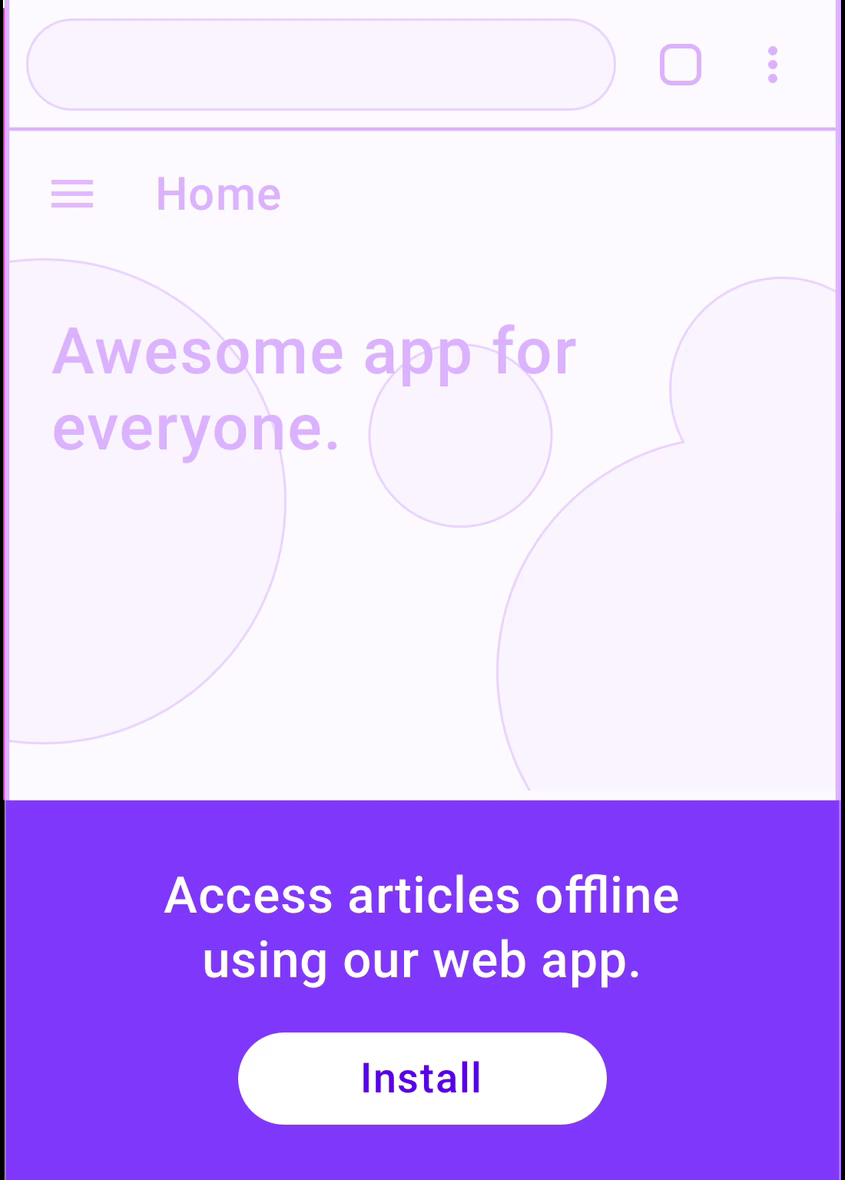
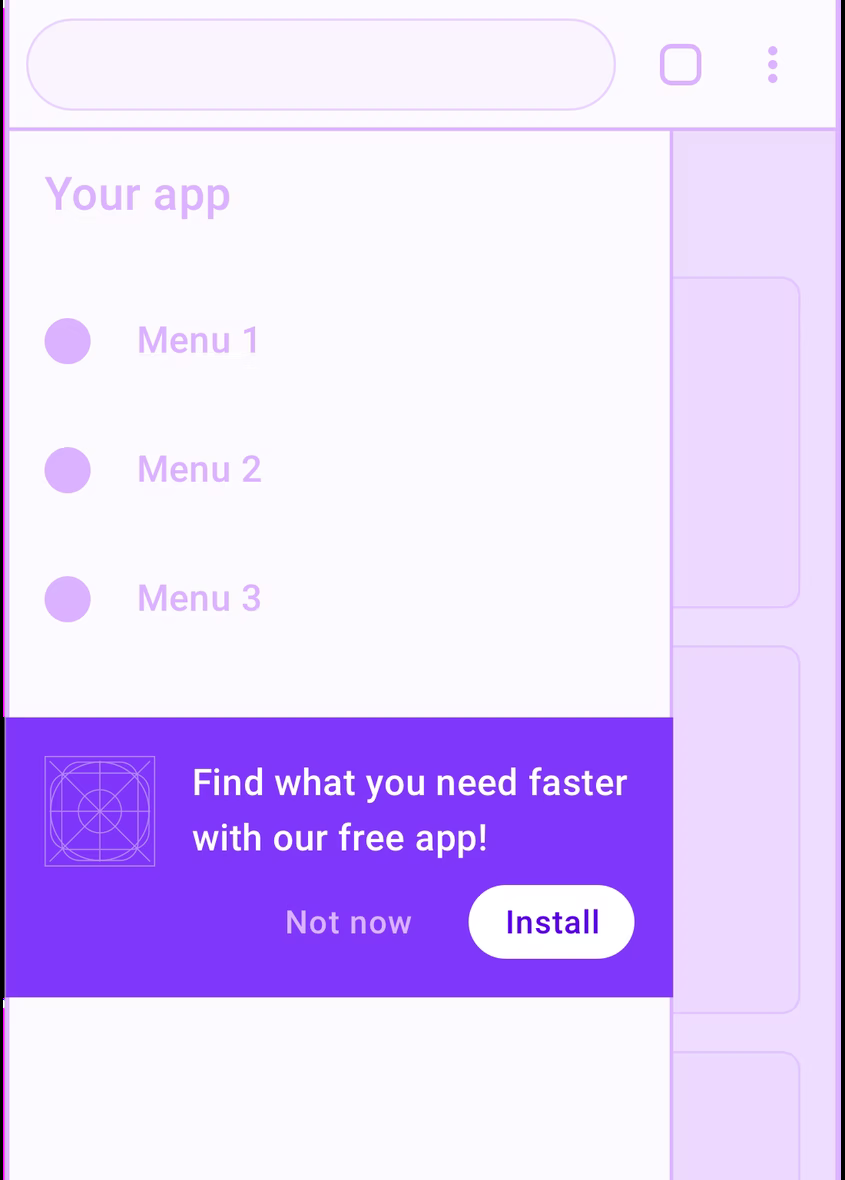
On Android devices, the process for installing a Web App on either Firefox or Chrome is very straightforward and there are many options as shown by the following examples taken from web.dev.
Developers have a huge freedom of choice and can add installers in headers, footers, menu bars, and temporary pop-ups backed by an open API. This ensures that there is minimal difficulty installing a Web App on Android.
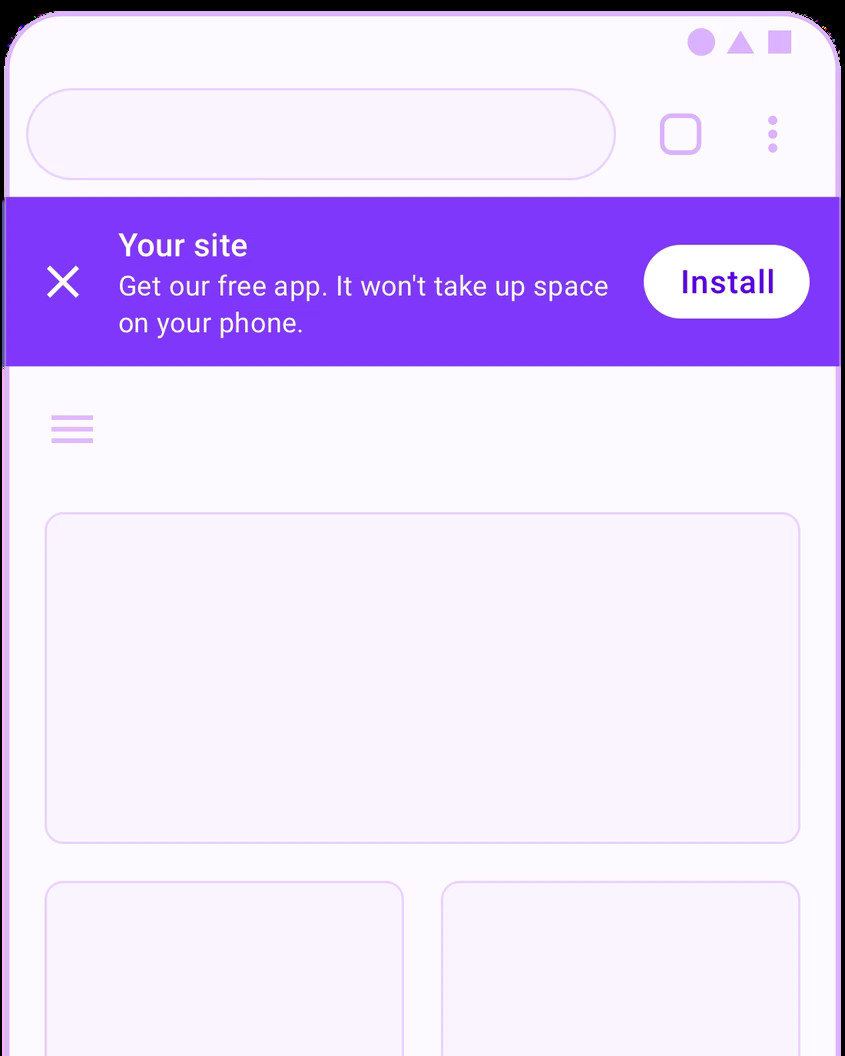

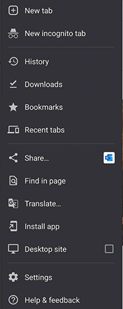

Finally there is a clearly marked “Install App” on the main menu. As demonstrated there is no barrier to installing Web Apps on Android systems and is made easy for developers to add and users to use.

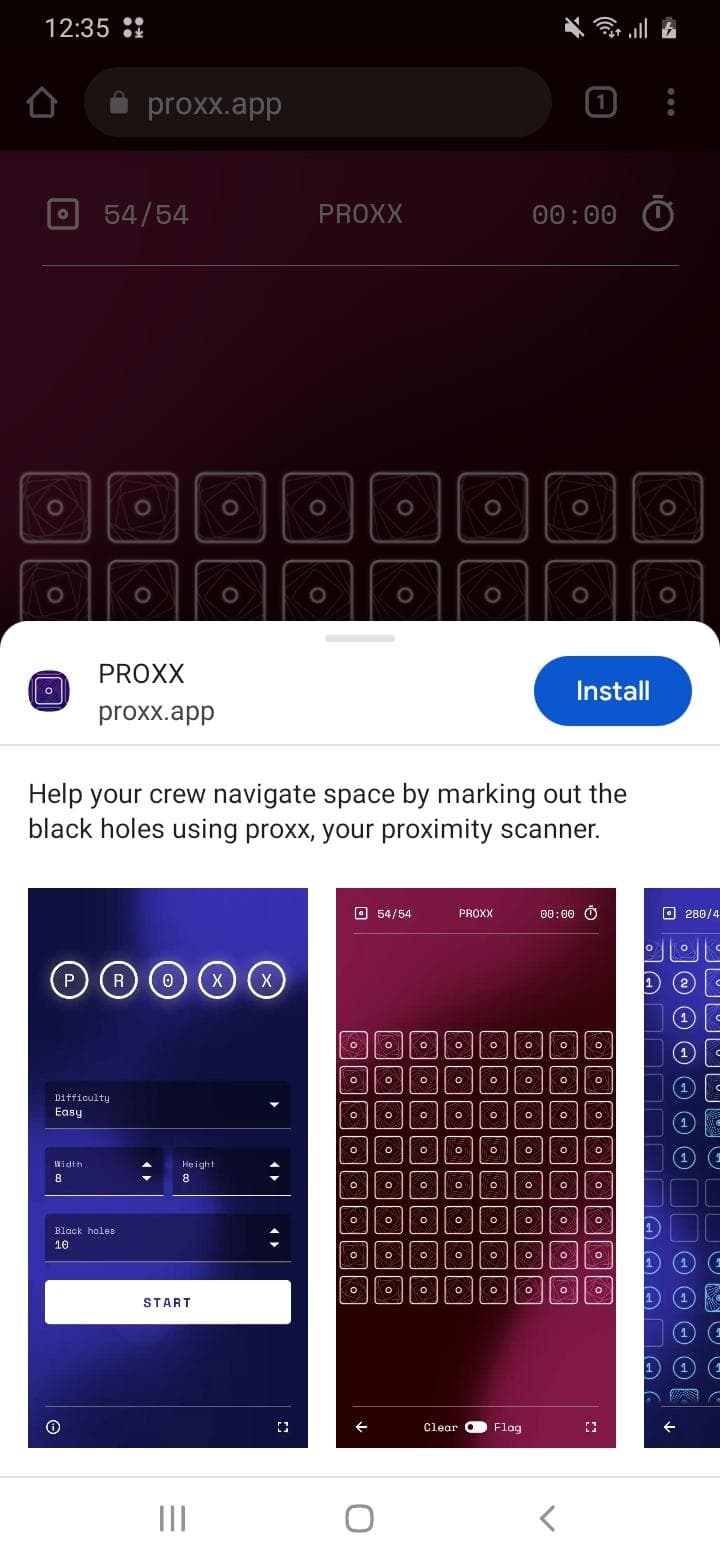
As a real life example, the game https://proxx.app displays a pop-up bottom banner when you first play, sliding that up displays more information about the app. Tapping install can directly install the app although the exact experience differs between different manufacturers devices.
5.4.5.2. iOS Safari
The process on iOS Safari is considerably more difficult and quite a bit more hidden and awkward. The majority of users we have asked do not know the functionality exists and have never used it. Apple has refused to implement this feature without any good justification providing App Store apps a significant advantage over Web Apps.
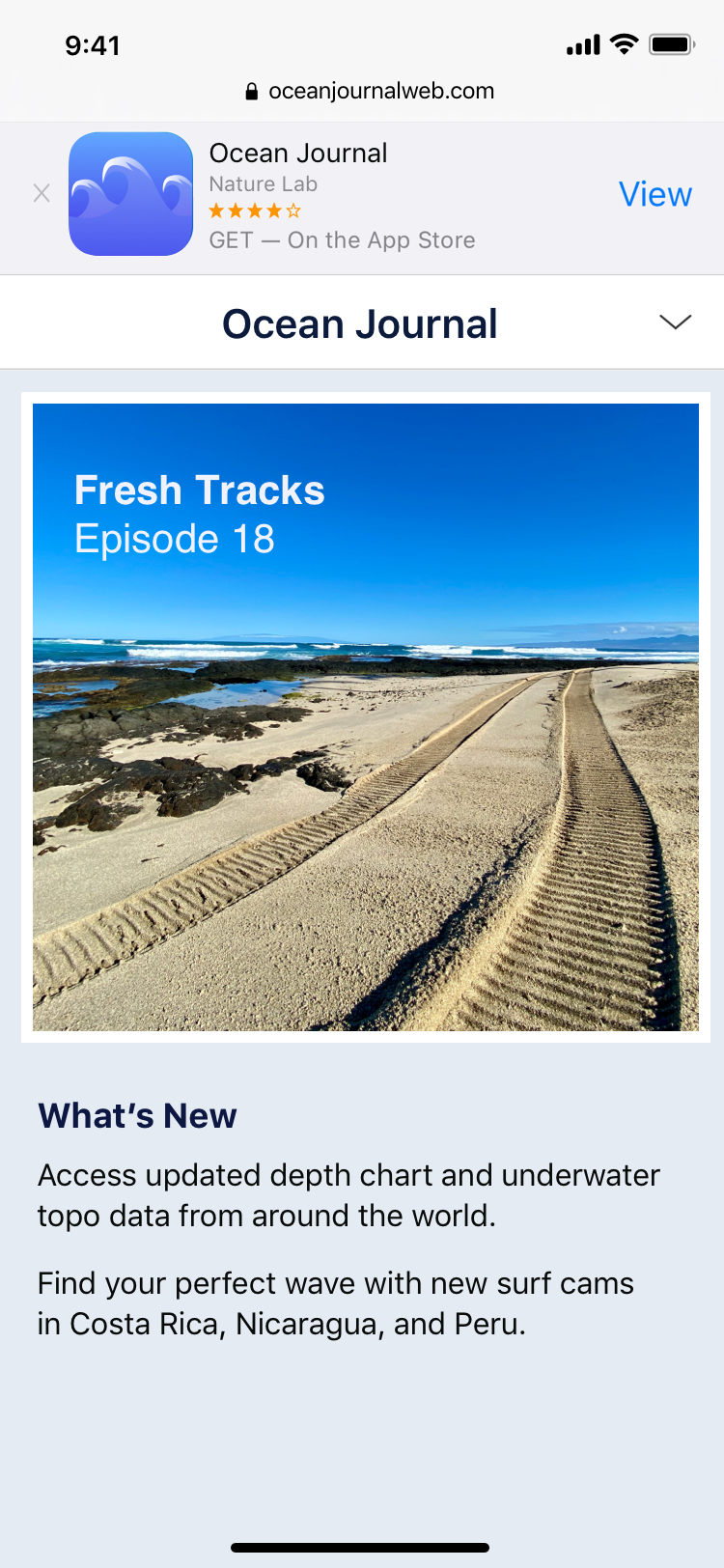
On iOS, Apple makes installing native apps very easy with Smart App Banners while making installing open Web Apps as obscure as possible. Even when on phone support with users it can be difficult to explain how to add a Web App. This is not a problem on Android.
You can see in the example taken from Apple’s documentation that a link to the native app is prominently displayed at the top of the screen.
To install a Web App on iOS the current process is as follows:

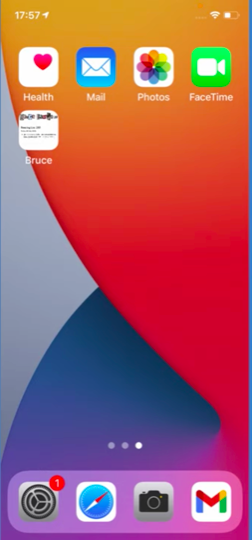
Other “browsers” on iOS do not have the ability to install Web Apps.
This means that despite simply being thin user interface shells around Safari’s WebKit, every “browser” on iOS including Firefox, Chrome, Edge, Opera, Brave can not add Web Apps. Users visiting a Web App capable site in these browsers on iOS would not even find the install button unless they would know to switch to Safari, then go through the steps as described here. This is clearly evidence of Apple preferencing their browser and native apps.
5.4.5.3. App Clips
An App Clip is a micro-version of native iOS application which allows consumers to load and use part of the application without installing the full application.
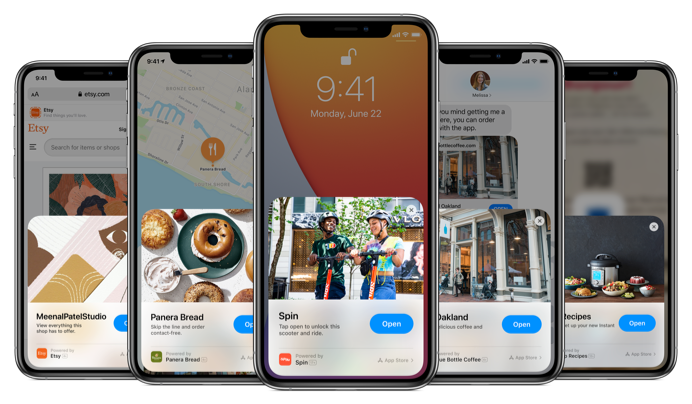
App Clips as shown on Apple.com This is good for native application developers who want to decrease friction by allowing users to nearly instantly preview or use a subsection of functionality. An App Clip does not require a user to have to go through the App Store, removing a key barrier.
As seen in the previous section, Apple has not implemented any way to inform users that they can install a Web App, and makes the whole installation process very cumbersome. In the meantime, Apple has added the ability for developers to display these native App Clip panels on top of web pages often to incite users to use a native app instead of the web page they are currently viewing.
Apple’s addition of this feature while at the same time ensuring that Web Apps are hidden away, difficult to install and have other barriers to adoption which increase user friction, is a clear demonstration of anti-competitive behaviour.
5.4.5.4. Smart App Banners
Apple has a technology called Smart App Banners. These are little banners that appear in Safari when visiting a url that matches the universal link patterns set for an App or by including a special meta tag.
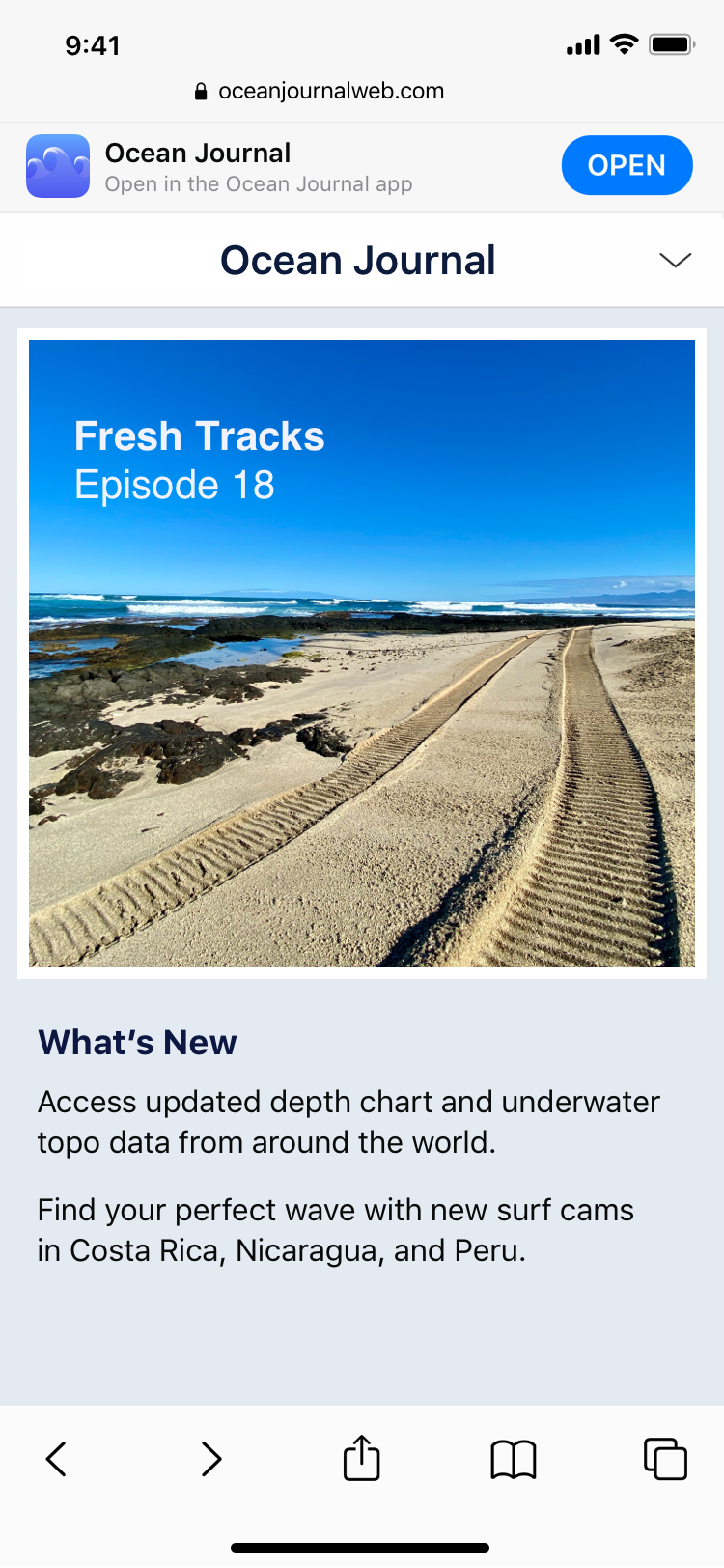
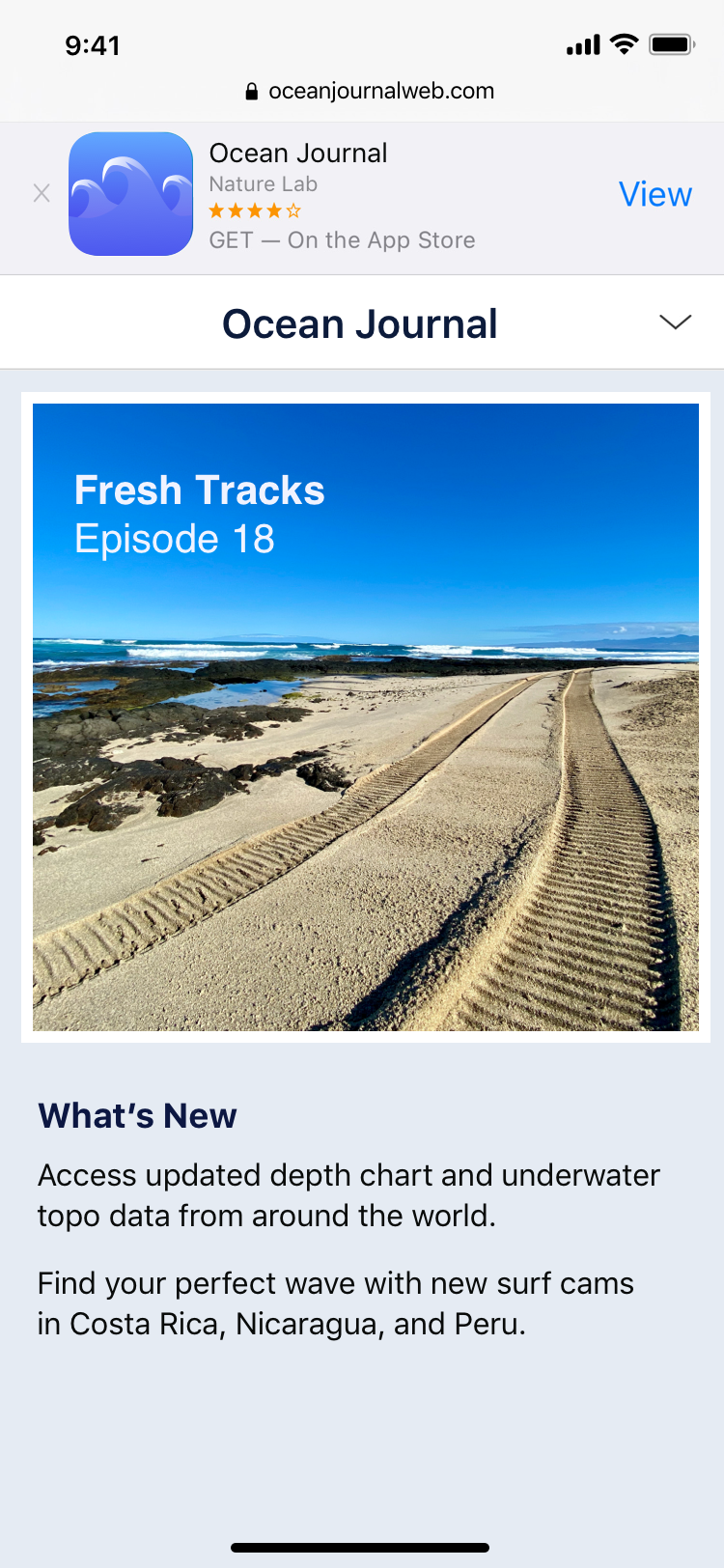
If the App is not installed it displays a deep link to the iOS App Store. If the App is installed it provides a link to open the App on iOS.
According to this complaint there is no way for the developer to stop the Smart App Banner from appearing even if they do not add the meta-tag. Provided the universal link patterns set for an App match it will display the banner.
There is no meta-tag to disable this behavior, forcing all developers to include a banner on their Website even if they wish to disable it is a clear attempt to direct traffic off the Web and into Apple’s ecosystem. Smart App Banners should likely be opt-in and respect the developers wishes. At the very least developers should be able to opt-out.
5.4.5.5. Dark Patterns
"Dark patterns are design elements that deliberately obscure, mislead, coerce and/or deceive website visitors into making unintended and possibly harmful choices."
The friction added to installing Web Apps by hiding away installation options, preventing the installation from other “browsers” and the clear preference shown to native apps through Smart Banners and App Clips are arguably dark patterns and can completely hobble developers' attempts to provide apps to their users through the open web.
Despite Apple’s claims to regulators that “PWA’s eliminate the need to download a developer’s app through the App Store (or other means)” the reality is that Apple has limited the user experience for Web Apps to the point where developers are forced to develop native apps.
5.5. Apple Uses Flawed Privacy Arguments
“The most dangerous feature that browsers have are not the device API’s; it is the ability to link to and download native apps."
5.5.1. Fingerprinting and Web Device APIs
The goal of fingerprinting is to reidentify users uniquely (without their permission), this is typically for advertising purposes. This is done by collecting many different data points about the device (ip address, screen size, operating system version, existence of certain fonts). Each of those data points cannot identify an individual, but it could be possible to track users if you have enough of these data points and combine them.
Apple has rejected certain web standard device APIs that would provide Web Apps equivalent capabilities to Native Apps (the web standard versions are actually arguably much more strict and secure than their native counterparts, see Section 4.14 below).
“Finally, if we find that features and web APIs increase fingerprintability and offer no safe way to protect our users, we will not implement them until we or others have found a good way to reduce that fingerprintability.”
— Apple
This was the stated reason Apple used to reject WebBluetooth from Safari (Webkit). This doesn’t make a great deal of sense.
Bluetooth is a short-range, standardized wireless technology standard that is used for exchanging data between fixed and mobile devices over short distances. Web Bluetooth is an API that provides the ability to connect and interact with Bluetooth Low Energy peripherals (but not classic Bluetooth devices, for security reasons). For example printers, toys, scanners, lights, home automation, washing machines, dryers, scanners, payment devices and a huge list of other “Internet of Things” (IoT) devices.
With Web Bluetooth, a Web App can not get a list of bluetooth devices. Instead, only with user interaction (e.g., clicking on a button), can a site request the browser open a permission prompt to connect to a bluetooth device and the site can provide filters to potentially reduce the list to devices it can understand, but cannot skip the user’s consent. The list is made available to the user, not to the Website/Web App. The user can give access to a single device or deny access altogether.
This is a very unreliable method of fingerprinting and requires a scary permission prompt to the user on each Web App.
Similar arguments can be extended to each of the other hardware APIs, they are all difficult to use for fingerprinting as it's impossible to do so without alerting the users and requiring their permission.
“Device API’s are simply bad for fingerprinting. It is unreliable and really obvious when it is used.”
We are not saying that iOS Safari must implement every feature implemented by the other browsers, in fact it is healthy for browser makers to pursue their own vision for the web. What is a problem is that Apple has banned all other browsers, so on iOS users have no option to use a different browser that does support these APIs.
It should be expected that privacy and security standards that apply to the web should also apply to native apps where Apple derives their profit.
Apple by both not supporting these APIs in iOS Safari and banning all competing browsers, is making it impossible for Web Apps to compete with native apps in cases where these device APIs are a core or important part of the application.
It is important to note here that Apple in their rejection of Web Bluetooth and other Device APIs have focused on fingerprinting (as opposed to firmware hacks) despite doing a far poorer job in mitigating these risks in native. Possibly this is in a effort to frame the rejection of these features through the lens that both Apple is pro-privacy as opposed to a general belief that the web should not be an application platform on iOS, and as a slight on other browsers vendors/developers by implying they want these features in order to spy on users.
5.5.2. Native vs Web Privacy/Security
The web’s paranoid security model was not developed in a vacuum. Browsers have evolved to place a high value on security and privacy, and the same is true of the Web Bluetooth Security Model.
Behind each expansion of browser capabilities is a simple idea: if browsers do not provide important features, users will feel the need to install applications to meet their computing needs. It is also important to note that there is no discussion of entirely removing for example bluetooth from iOS (web and native).
Therefore, privacy and security risks must be viewed in terms of mitigation and in comparison with native apps. As such bluetooth is a useful example to compare web and native in utility/privacy and security. From this vantage point, we can compare the level of care taken by browsers in exposing bluetooth devices versus native apps.
5.5.2.1. Potential security/privacy concerns
A number of potential security and privacy issues have been raised by participants in the Working Group developing the Web Bluetooth standard:
These include:
Malicious messages sent to poorly designed, or older, bluetooth devices. A Website/Web App could connect to poorly designed older bluetooth devices and then hack them to launch further attacks on the user.
Note for this attack to work:- The device needs to be poorly designed without functionality that prevents an attacker from doing harmful actions. Note that most devices that offer a harmful actions have security protections in place (i.e. they required updates in place)
- The attacker needs to have specific code that targets that device, the user has to own that device and then ask to connect to that device and then the user has to give the website permission.
- The Web Bluetooth specification maintains a block-list of known-vulnerable devices which browsers are expected to block from connections.
- Browsers include the ability to strip permissions, including blocking the loading of, websites that act maliciously in this way (e.g. Google’s SafeBrowsing, used by Chrome and Firefox, and Microsoft SmartScreen)
Collecting lists of nearby devices (for location tracking)
Shops could place bluetooth devices on their premises and a Website/Web App with completely unfettered access to bluetooth could connect to them thus revealing the users location without permission.
Thankfully, the Web Bluetooth specification prevents this ambient attack by creating the opportunity for a user to select the devices they wish to connect to before any data is sent.Fingerprinting
The goal of fingerprinting is to reidentify users uniquely (without their permission), this is typically for advertising purposes. Typical fingerprinting is done by silently collecting many different data points on the website (ip address, screen size, operating system, existence of certain fonts). Each data point is unlikely to uniquely identify an individual, but it is possible to track users if you have enough of them. A user connecting to the same device on two different websites could uniquely identify the user.
Web Bluetooth adds a strong deterrent to ambient fingerprinting through the addition of a user-visible permission prompt. Permission-based APIs are not frequently used for fingerprinting today due to the low acceptance rates by users of these grants, making them nearly useless for pervasive, low-friction fingerprinting.
Risks endure for users who have elevated threats and clear their caches, but thanks to the permission model of Web Bluetooth, browsers can also inform users of the risks of re-identification at the time of use. By managing these capabilities more tightly than native OS APIs (which expose blanket grants to bluetooth stacks), browsers mitigate these risks more directly.
5.5.2.2. Process for connecting to a device on web and iOS native
5.5.2.2.1. Web
The process in the web specification is as follows:
- Upon a user gesture (click, touching a button etc) the Website/Web App may request to connect to a specific bluetooth device OR they may provide a specific category of device to be used as a filter.
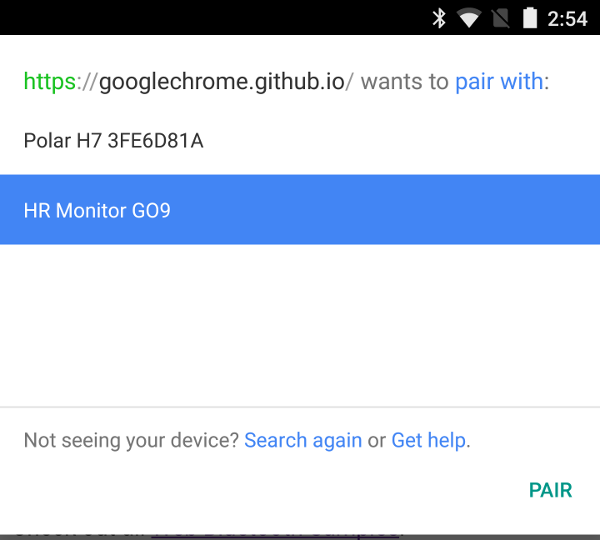
- The browser displays a prompt to the user indicating that the Website / Web App would like to connect to a bluetooth enabled device and displays a list of devices.
The Website/Web App never gets to see this list of bluetooth devices, it may not connect to any device without specific consent. 3. If the user choices to connect to a device, the Website/Web App may now communicate with that specific device 4. This permission can be revoked at any time via the browser but it is important to note it is only for this specific Website/Web App and only the specifically chosen device
5.5.2.2.2. iOS Native
The process for iOS native applications using Swift CoreBluetooth is:
- Declare that the application needs to use bluetooth along with a description in the
info.plist* - On first boot of the application, it will ask the user permission (via a prompt) to use bluetooth *
- If the user agrees the application now has access to bluetooth *
- This permission can be revoked at any time via user settings
- The application can now get lists of any nearby bluetooth devices and connect/communicate with them indefinitely without user interaction.
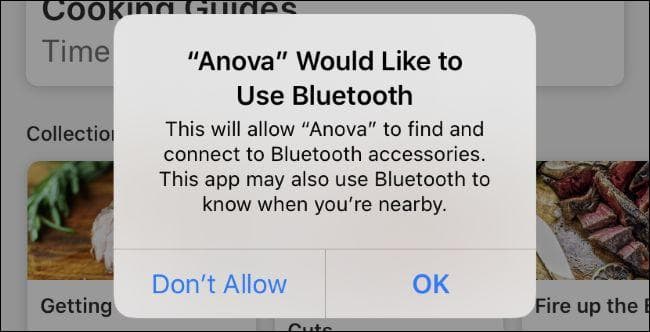
* Until 2019, steps 1 - 3 were not required. This means before 2019 that the very large number of apps with bluetooth permissions track all users and connect to any device.
5.5.2.3. How does iOS bluetooth for native apps mitigate these concerns?
The permission system on iOS is a bit more of a blank check. Once given initial Bluetooth permission, applications are essentially given free reign to do whatever they want with regards to Bluetooth. They can list all nearby devices (without user interaction) and they can communicate with any nearby Bluetooth device (without user interaction).
Prior to iOS 13 (late 2019) the situation was even worse. Applications did not even need to ask for bluetooth permission at all.
Many companies were using this to track users' locations without their consent. Shops were placing bluetooth beacons in their stores and then tracking users' physical location without consent. This was only possibly due to the weak security/privacy implementation on iOS Native CoreBluetooth. Note this still has not been fixed and this sort of abuse is still possible today, provided an application can convince a user that it has a plausible reason to provide access to bluetooth (a simple yes/no prompt).
All three of the above listed privacy/security concerns are currently essentially unmitigated except by:
- App Store Review (a dubious defense)
- The user giving permission to access bluetooth once
It's odd that Apple is not implementing Web-Bluetooth over security/privacy concerns and, in effect, forcing users to download a native app with far broader powers when they don't appear to have adopted equivalently strong protections within their native app ecosystem. Rejecting WebBluetooth on these grounds is nonsensical.
These issues still have not been fixed with native iOS Apps bluetooth permissions. Their APIs were not designed to enable a more respectful prompt the way the Web Bluetooth specification was, and shifting all existing applications to a less invasive model may break many unmaintained programs. In these tradeoffs Apple could choose user privacy and security and against invasive developers, but they have not, and yet they hold up the less problematic web API as an unacceptable risk.
When comparing risk in allowing a Web App feature, the comparison is not between the risk the feature brings and nothing (i.e not allowing the feature). The comparison is between the feature and getting the user to download a native application with an analogous feature.
As shown in the previous sections, with regards to bluetooth the web is far more restricted, secure and private than what is allowed in native. It could be argued that not allowing Web Bluetooth is actually worsening the user's risk profile, in addition to denying them convenient functionality. If the only alternative is to download a native app with far greater permissions then this arguably puts the user at greater risk.
Web Bluetooth is largely analogous to the other Device APIs.
Device APIs and File System Access are probably the most complex in terms of security privacy. There are legitimate security concerns (as there are with equivalent APIs for native applications). The web specifications have in our opinion largely mitigated these concerns (certainly far better than native apps on iOS have).
Apple has done an extremely poor job communicating what their concerns are (in sufficient technical detail, including why they think the mitigations are insufficient) to developers and other browser vendors.
5.5.2.4. Safari WebBluetooth Extension
"Can't we solve this using browser extensions?"
In the last public discussion about Web Bluetooth Standard between Apple and the other browser vendors it was suggested that browser extensions could offer a potential solution.
The idea is that users who need Web Bluetooth could install a browser extension via the iOS App Store that provides this functionality to Safari. A prototype of this has been produced for iOS.
While developers producing these types of extensions are almost certainly just trying to help users, this solution is problematic for several reasons:
- Security/Privacy is hard, Device APIs are powerful and while they provide great utility this seems more a job for the dedicated teams at the browser vendors to handle.
- iOS Native has poor privacy protection relative to Web Bluetooth and the developer of these extensions would need to attempt to replicate all the mitigations in the extension itself.
- It is arguably a dark pattern to discourage usage of Web Apps vs Native Apps to add extra hoops for users wanting to use Bluetooth on the web. This style of solution would presumably be unacceptable for Native Apps.
5.5.2.5. Apple's Identifier for Advertisers (IDFA)
"Apple has a tactical commitment to your privacy, not a moral one. When it comes down to guarding your privacy or losing access to Chinese markets and manufacturing, your privacy is jettisoned without a second thought."
— Cory Doctorow - Former European director of the Electronic Frontier Foundation
Given Apple’s strong stance on user privacy on the web, to the point of rejecting extremely useful functionality on the mere possibility that a user could be assigned a unique identifier it may surprise readers to learn that Apple offers a method to uniquely fingerprint users in native apps called Apple's Identifier for Advertisers (IDFA).
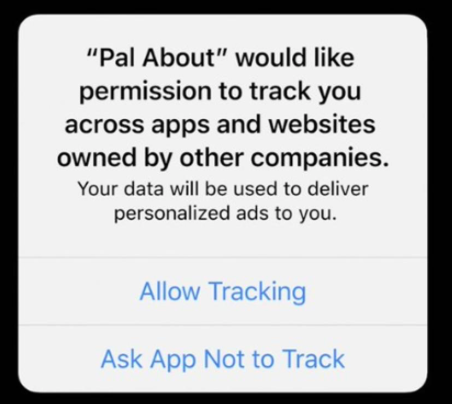
Up until iOS 10 there was no way for users to disable this, starting in iOS 14 users are asked via this slightly ambiguous prompt if they consent (about 20% of users have turned this operating system provided fingerprint off).
Even when users do turn this functionality off, due to Natives' very permissive privacy and security model (relative to the Web) Apps can continue to fingerprint users.
"Our investigation found the iPhone’s tracking protections are nowhere nearly as comprehensive as Apple’s advertising might suggest. We found at least three popular iPhone games share a substantial amount of identifying information with ad companies, even after being asked not to track.
When we flagged our findings to Apple, it said it was reaching out to these companies to understand what information they are collecting and how they are sharing it. After several weeks, nothing appears to have changed."
The only consistent privacy policy with Apple’s concern for uniquely fingerprinting users on the web and with users being tricked via prompt) would be to remove this functionality from iOS altogether.
Apple has not announced any plans to entirely remove this functionality from iOS. Apple’s privacy stance needs to be consistent to believe that they are doing it for the benefit of the user. If they apply strict conditions that limit functionality on the web but allow pervasive tracking in native it can be argued they are providing pervasive tracking in the area which generates revenue while applying heavy restrictions beyond what is needed to prevent tracking on the other side.
5.6. iOS Safari is Buggy
In the Mozilla Developer Network Web Developer Needs Assessment 2020 Survey developers listed browser compatibility issues as the largest issue as defined by:
- Having to support specific browsers (e.g IE 11)
- Avoiding or removing a feature that doesn’t work across browsers
- Making a design look/work the same across browsers
- Testing across browsers
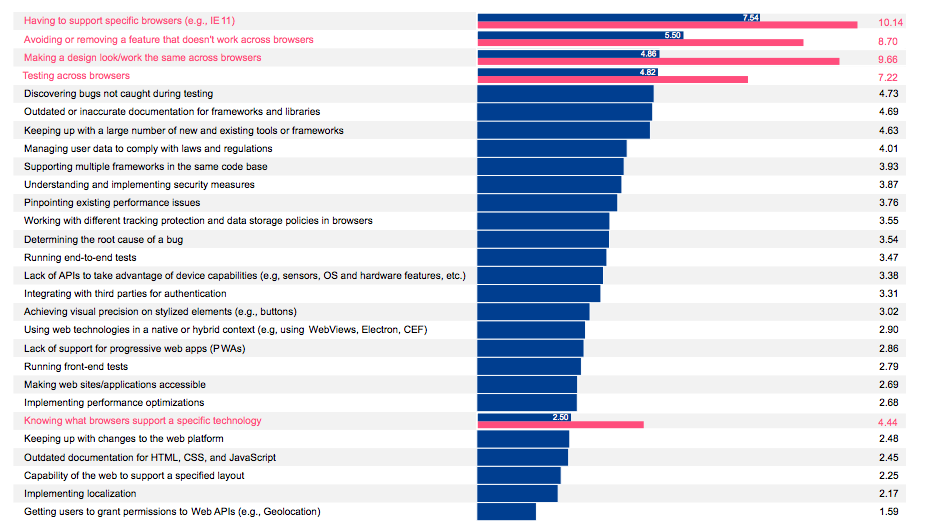
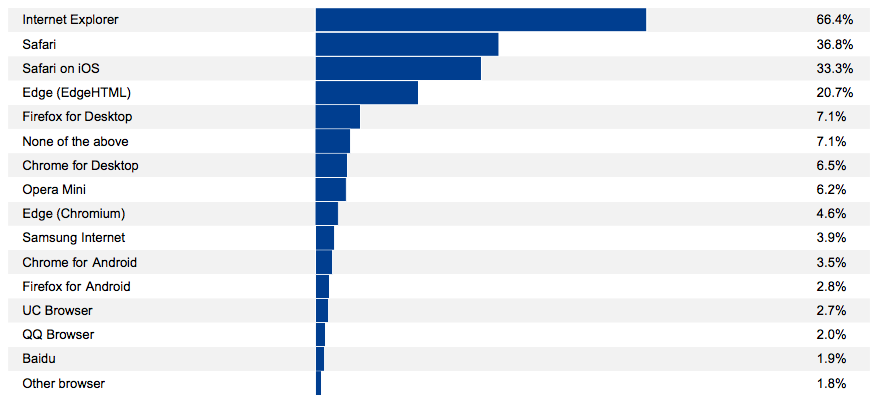
Drilling down further it was specific browsers that were causing the issues.
Internet Explorer is at End of Life in June 2022, and has not been in serious development since 2015. This means that Safari causes at least 5 times more issues than the next active browser on the list.
Note that Edge (based on the EdgeHTML engine) has been discontinued and now accounts for much less than 1% of global use. The Edge browser has been rebuilt on Chromium.
This suggests that once Internet Explorer ceases to be used (its usage is already below 1%) then the primary browser causing serious issues for developers will be Safari.
Safari on iOS has had countless, severe application breaking bugs that make it impossible to use as a foundation for a stable application. Furthermore, the mechanism by which updates for Safari on iOS are pushed to users, requiring a full OS update instead of just updating the browser, means it can take multiple weeks, if not months, for a severe bug to be fixed. All this time, Web Apps and sites may be broken or even unusable. This means many companies are forced to develop native applications simply for the stability they provide.
It is important to note that we believe these bugs are likely a result of reverse incentives in relation to the App Store and a lack of competition which has led to a systemic underfunding of the Safari/webkit team for many years. It’s likely that the Safari/Webkit team is working as hard as they can to make a stable browser but just can’t keep up because Apple has not provided enough resources for them to be able to do it.
5.6.1. State of CSS Survey
CSS stands for Cascading Style Sheets which is used for formatting and layout for websites and Web Apps. It is one of the four languages used to develop websites and Web Apps, along with HTML, JavaScript and WebAssembly. It is used in nearly every web page, and is definitionally an uncontroversial core web standard.
The State of CSS survey of web developers recently had a question about "pain points" and "browser incompatibilities". In the raw text of the answers, the yellow lines are the ones that contain the word Safari:
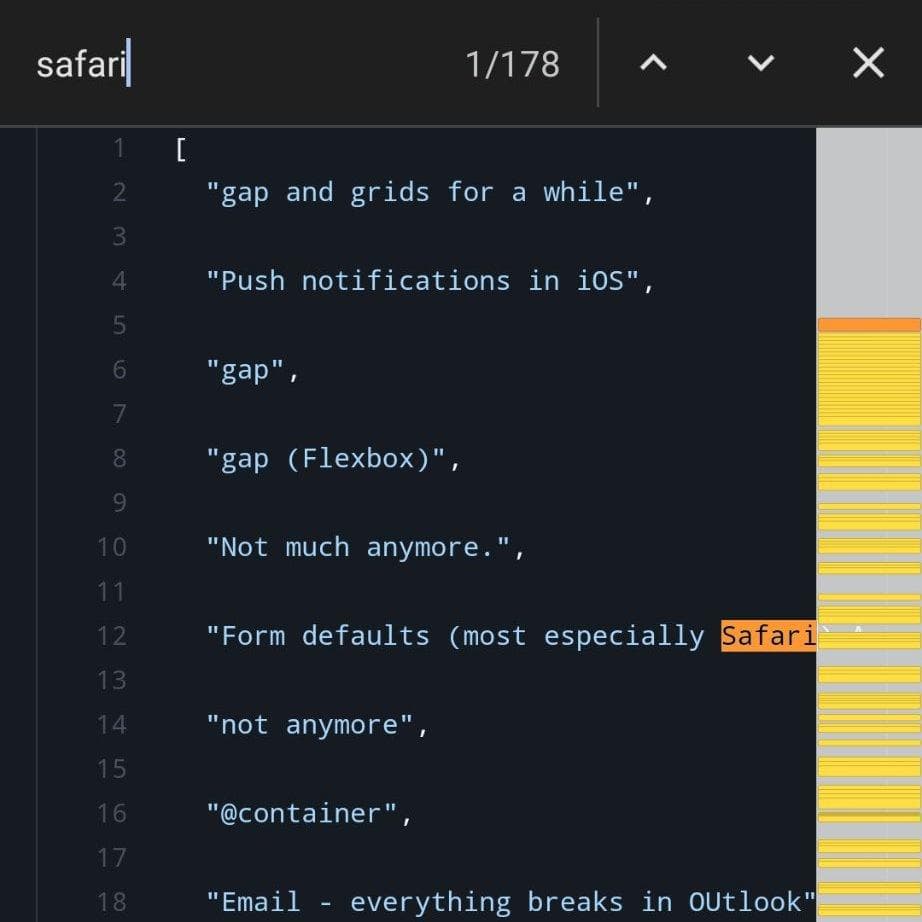
Extracting some of the quotes from the survey, it’s obvious that the opinion among developers that Safari is both buggy and lagging behind features is commonly shared amongst developers. Safari/iOS/webkit/iPhone/ipad was mentioned 369 times several times. By comparison Firefox only had 12 negative mentions in the entire survey.
Here are some extracts from the survey:
"I hate Safari with a passion of a thousand burning suns."
"Why is Safari so crap? Why on earth do I still have discussions about IE11?"
"The Safari team should put their head out of their arse - Safari, Especially iOS Safari, are such a pain to work with as a webdeveloper, they lag years behind on too many features for both CSS & JS."
"Safari feels pretty behind the times most of the time"
"Safari is always years behind Edge/Chrome and has many many many bugs related to viewheight/scroll."
"iOS Safari is the biggest limiting factor in all web development."
"mostly things that safari is catching up on"
"safari is evil"
"Flex gap :( it's so good but Safari is the new IE."
"Safari is the main problem"
"Full screen height is a pain to work with in Safari"
"Still have been held back by IE11, but that ends soon. (Safari though...)"
"Anything Safari doesn't want to implement"
"Safari is just weird a lot"
"Too many to list for Safari on iOS/ipadOS"
"Only lacking/lagging support in Safari"
"Safari in general has issues with standards implementation"
"All of CSS with Safari. Notch specially"
"All the new stuff being held back by Safari"
"Anything iOS Safari doesn't support is a blocker, because its rendering engine is mandatory in iOS."
"Anything new when using a WebKit browser -.-"
"Anything related to Apple company, most of the new features are not available over there;)"
"Anything safari does not support"
"Anything Safari doesn't want to implement"
"Anything that Firefox and Chrome support but Safari doesn't. It's a pain having to account for Apple's low bar."
"Anything that’s implemented differently in Safari & iOS Safari"
"Better Safari update cycle, detached from OS updates"
"Bugs in Safari related to shadow DOM."
"Everything Safari doesn't support but Chromium & Firefox do"
"Flex gap, damn you Safari!"
"focus-visible is not yet supported by Safari"
"For whatever reasons, I wish Safari was quicker at implementing things."
"Full screen height is a pain to work with in Safari"
"height being inconsistent on IOS safari"
"I hate Safari."
"I have more and more instances where stuff works everywhere but not in Safari."
"I just treat safari as a hellhole where css goes to die"
"I often find myself with layout issues that only happen in Safari"
"I'm not sure exactly what it is, but Safari is now my problem child across all metrics. It seems to be a little different each time, but overall Safari is always the browser with CSS related bugs."
"Incompatibilities, poor CSS support in Safari"
"It is difficult for me to treat Safari as an important testing target or to pretend I care about its compatibility when Apple seems utterly determined to make it difficult to test on Safari, and to use its incompatibilities to hold back open web development on Mac and especially on iOS. I increasingly feel that Safari doesn't really want to be part of a creative or open web, and that's fine I guess, but I'm not going to waste my time and money buying an iPhone to test on when Apple would just prefer I made a native app for their platform anyway."
"Just all of Safari."
"Just wish Safari would die already"
"Main CSS pain point above all: Safari (i.e. all iOS) being rigged with bugs and lagging behind in features."
"Many technologies blocked by lack of Safari support"
"Mostly just slow adoption by Safari"
"mostly things that safari is catching up on"
"Nearly all pain points are Safari."
"Not any specific at the top of my head, but usually Safari is the one giving me a hard time :("
"Not many but it's annoying when it happens. It's usually Safari lagging behind or rendering random stuff instead of the UI specified."
"Not really difficulties, but Safari is one he** of a pain in the a** and having a more precise way of targeting it instead of both him and Chrome would be great (like -moz- prefix instead of having to write a bunch of @supports)"
"Only lacking/lagging support in Safari"
"Perf issues in Safari"
"Pretty much anything modern, as Safari is lagging behind."
"Pretty much anything that Safari shipped less than 18 months ago"
"REMs in media queries. Damn you Safari!!"
"Safari (in general)"
"Safari and apple in general have incompatibility because they are late"
"Safari became the new Internet Explorer fro us"
"Safari feels pretty behind the times most of the time"
"safari has been a bit of a pain"
"Safari imcompatibilities"
"Safari iOS is becoming tiresome."
"Safari is a huge mess"
"Safari is always years behind Edge/Chrome and has many many many bugs related to viewheight/scroll. iOS Safari is the biggest limiting factor in all web development."
"Safari is constantly dragging its heels."
"safari is evil"
"Safari is just weird a lot"
"Safari is neglected"
"safari is pain in the ass for debug if you have pc"
"Safari is the main problem"
"Safari is the new IE"
"Safari is the new Internet Explorer..."
"Safari on iOS :D"
"Safari should die!"
"Safari sucks"
"Safari updates not frequent enough"
"Safari, especially mobile"
"Safari. Everything WebKit. Freaking Apple…"
"The number one web problem is browser compatibility. Browser like Safari is slowing down the evolution of web unfortunately"
"Too many to list for Safari on iOS/ipadOS"
"Using Flexbox to layout forms because Safari on iOS shrinks radio buttons."
"we can create any new features, but if browsers (like Safari) are waiting 3 years to implement it, it's totally useless."
"WebKit is never up to date and doesn't implement features fast enough (or at all)."
"yea, loads, mostly because of safari - like gap or ::marker"
"Yeah Safari is killing me, it's the new IE!"
"Yep, Safari is the new IE regarding grid and flexbox issues"
"Yes - and Safari is nearly always the browser that gets it wrong."
"Yes, horrible Safari support"
"Yes, specifically compatibility with Safari"
"Yes, usually it's Safari. It became new IE😂"
"Yes. And we have Apple to blame for it! Flexbox gap is a good example."
"Yes. Too much new useful features not supported by fcking safari."
5.6.2. WebRTC
WebRTC is a standard for web video calls, access to microphones and cameras, and enables streaming video applications such as game streaming (Stadia, xCloud, Luna, GeForce NOW, etc.).
“During March 2020 and the rise of the pandemic in Norway EVERYONE needed video calling. We are the number one video calling tool for healthcare here, and our use base is around 60% iOS Safari. I can tell first hand having to deal with onboarding 70% of the doctors in Norway with active bugs on iOS in simple things like media reliability, and with no real alternative (a lot of people only have one modern device, and that's their phone), it was near catastrophe for us, and a lot of pain for doctors missing their patients due to bugs”
— Das-Igne Aas – CTO Confrere
5.6.3. IndexedDB
IndexedDB is a local browser database for storing data. It is essential for many apps, especially apps that require offline functionality. IndexedDB on iOS Safari has had many bugs and been broken many times since it was first introduced. Recently, both IndexedDB and LocalStorage, a similar API for storing small amounts of data, were broken, leaving developers little alternatives to store data or risk data loss or corruption. Local Storage which is also essential for many websites was broken at the same time.
"Apple's WebKit team has managed to break the popular IndexedDB JavaScript API in the latest version of Safari (14.1.1) on macOS 11.4 and iOS 14.6."
"Ran into a spectacularly awful Safari bug in the latest Safari (14.1.1 on macOS and iOS 14.6).
Opening an IndexedDB database fails 100% of the time on the first try. 😩
If you refresh, it starts working.
Bug report: https://bugs.webkit.org/show_bug.cgi?id=226547
It's really really hard to build reliable websites on macOS and iOS with showstopper bugs like this.
This should have been caught by basic unit testing."
5.7. Default Browser Choice
Until late 2020, it was impossible for iOS users to choose an alternative browser to handle links, even if they had installed other WebKit-skin browsers from the App Store. Apple continues to prevent competitors from bringing differentiating features via their own engines.
As the only company banning competing engines, Apple is clearly the worst offender, but they are not the only ones impeding user choice. It is our opinion that to preserve competition, users must be given the ability to easily change their default browser and that choice must be respected by the operating system
Google’s “Android Google Search App” has been ignoring browser choice on Android.
“Known as the "Android Google Search App" ("AGSA", or "AGA"), this humble text input is the source of a truly shocking amount of web traffic; traffic that all goes to Chrome, no matter the user's choice of browser.”
Facebook has been abusing IAB (In App Browsers) to prevent users from opening links from within the Facebook app in either their own browser or in a view that uses the users default browser (both iOS and Android provide this, although the iOS is only iOS Safari).
Using IAB (In App Browsers) to deny users choice is a very complex topic. This article does an excellent summary of the current situation and why it is bad for consumers. We have also made a separate submission covering this topic.
It is our opinion that mass market operating systems and major applications should as much as possible provide users with the means of selecting a default browser (complete with its engine) and respect it. Additionally they should avoid using dark patterns or misleading interfaces to favour their own browser.
6. Negative Consequences for Consumers and Businesses
It’s worth taking a moment to discuss why holding back the Web as an application platform, banning the rival browsers and having the iOS App Store be the only viable development platform on iOS is causing real harm to both consumers and businesses.
6.1. Blocks the web from being an interoperable applications platform
The Web could be an interoperable platform for applications on mobile devices but due to the lack of competition and key features being withheld it is incredibly hard (if not impossible) for them to compete with the App Stores. Safari has no competition from rival browsers on iOS. All the third party browsers on iOS are essentially Safari (a specific Apple provided and mandated version of WebKit) under the hood. iOS Safari has a significant mobile web market share around the world (around 50% in the UK and the US, up to 75% in Japan). This is important as bugs and missing features in Safari can not be avoided (as all the browsers on iOS are Safari). Safari has many bugs and seriously lags behind its competitors' feature set.
It's hard for businesses to justify supporting features that 30-75% of their customers can't use. This means if Safari doesn't support it then businesses don't want to use it. Additionally iPhone/iPad owners tend to be wealthier and spend more on software, businesses tend to follow revenue so Apple users have an outsized influence. This means that Apple's Browser Ban is not only holding web-apps back on iOS but also on Android.
As a result many businesses feel obligated to reproduce their Web Apps as iOS Native Applications.
6.2. Maintenance/Development Cost for Multi-Platform Applications
Native iOS Apps have to be written in Apple created languages (Swift/Objective C) and system APIs that are specific to iOS. You can not run an iOS Application on an Android device (typically written in Java). Web Apps however only have to be written once, in one language and then can run on any device.
In order to support multiple platforms for their application (without using Web Apps) a business will need to produce separate applications for iOS, Android and Windows. This typically involves expanding the team and having multiple code bases effectively multiplying the workload. Keeping multiple code bases in sync is also difficult and time consumer even for large businesses
This can increase by 2-5 times the development and maintenance cost. These costs must be passed onto consumers. For some smaller businesses it can cause the product not to be produced at all. Users also suffer lower quality applications because companies have to split their resources for developing and maintaining applications between two or three platforms, while they could have focused them on only one application.
6.3. Small teams might be forced in iOS Exclusives
Due to the cost mentioned in the previous section some small teams may decide to produce an iOS exclusive. This entrenches Apple’s lock-in and makes it harder for developers to reach a wider audience. Apple has a lot of leverage since iOS captures a significantly high amount of user time and attention, iOS users are wealthy and for businesses they represent an audience that cannot afford to under-serve. iOS is not an ecosystem that any developer is likely to be able to ignore.
6.4. Gatekeeper Tax
Additionally the business must then pay 15-30% of their revenue to Apple (further increasing costs by up-to another 44% for users).
For example, imagine you require $10 per user to cover the costs of developing, publishing and maintaining an Application. The Application Store that you are selling your App in decides to add a 30% fee. In order to still receive $10, you now need to charge $14.2, which is a 42% price increase for the end user. However the actual price increase will be higher as when you increase the price by 42% you will lose a percentage of users as you move to a higher position on the demand curve, causing the equilibrium price to be even higher.
6.5. Applications Banned on Apple’s whim
"there’s no safety, security or privacy issue - Apple just doesn’t like those apps."
"It should not surprise you to know that Apple’s interpretation of its text often seems capricious at best and at worst seems like it’s motivated by self-dealing."
Apple effectively ban certain categories of Applications they don't like or that potentially compete with their own offerings.
6.6. App Store Review Process
"there are endless horror stories around curation of the store. Apps are rejected in arbitrary, capricious, irrational and inconsistent ways, often for breaking completely unwritten rules."
"There's a lot of talk about the 30% tax that Apple takes from every app on the App Store. The time tax on their developers to deal with this unfriendly behemoth of a system is just as bad if not worse"
The App Store review process can be an extremely stressful and chaotic experience for businesses and developers despite problems with actually stopping malware.
6.7. Lawsuits and Criticisms
Apple may choose to boot developers who sue or publicly criticize them. This can make publicly disagreeing with Apple scary, when they can snuff out your access to half your mobile users with little recourse.
“Apple has blacklisted Epic Games from returning to its App Store ecosystem indefinitely despite the games developer saying it would disable its own payments system, according to a series of emails published on Twitter and a blog post by Epic CEO Tim Sweeney.
[...]
One of the published emails allegedly sent by Apple's legal representatives -- dated September 21 -- said the games developer's apps, such as its flagship game Fortnite, would not be allowed to return to the App Store until the US lawsuit was finalised.”
"In Sweatshop HD’s case, what is in fact a tasteful commentary aiming to raise awareness of modern-day manufacturing commissions through bright, addictive gameplay mechanics — in other words, an artistic statement — is being banned because Apple seemingly doesn’t want that awareness being raised."
7. Apple's Incentives
7.1. Advantages of the status quo for Apple
"Apple gains a lot by slow-walking progressive web apps on the iPhone"
Businesses that want to have applications on Apple mobile devices are forced to develop Apple native applications, which provides the following advantages to Apple:
Business Lock-In
Businesses have to go through the AppStore and provide Apple 15-30% of their revenue, which represents a significant share of Apple's revenue (estimated at $64 billion in 2020). Preventing Web Apps from being a viable alternative to native apps also allows Apple to maintain a high commission rate, as it is acknowledged in internal Apple emails that they are unable to charge such an amount on other systems which have competition for their App Store.
Not only is iOS too large of a percentage of the mobile market to ignore, iOS users are typically more valuable because they spend more money. Combined with the high cost of developing a native app for iOS, development companies will often target iOS first and then only optionally build apps for other platforms if they have the budget, expertise and staffing to do it.
This gives Apple an advantage over competing mobile ecosystems by enriching its exclusive application ecosystem which it can then use to push sales of its mobile devices. Web Apps do not offer this lock-in because they work on all devices regardless of manufacturer and operating system.Consumer Lock-In
They prevent Apple devices owners from switching to competitor mobile devices and operating systems as iOS Apps must be written for iOS. Many iOS apps never get rewritten for Android, so they are not available (It's very expensive to write the same App 2-3 times in different languages)Control
Apple can ban categories of applications for no reason other than they don’t like them (game streaming for example)*.Barriers to Entry
They prevent the emergence of competing mobile operating systems, because many applications are only available on iOS and since they are not interoperable, emergent competitors have an insurmountable disadvantage since they don’t have access to a library of useful apps. This is arguably one of the biggest reasons why Microsoft’s Windows Phone operating system failed - Microsoft never managed to convince companies to invest in building and maintaining apps for yet another mobile operating system. Even a juggernaut like Microsoft was not able to break into the mobile operating systems market.Google Search Engine Revenue
Apple have a $15B annual deal with Google to set Google as the default search engine on iOS Safari (9% of Apples Annual Gross Profit)Cost Cutting to boost margins on hardware - By only allowing Safari to mint subprocesses Apple can save money on RAM**
* “But some seem to be just personal preference, or taste - most obviously, the decision in the last few weeks to block streaming games services from Microsoft and Google. This may partly be about revenue, but the real issue seems to be that Apple thinks that games on iOS ’should’ use native APIs, and, perhaps, that they ‘should’ work without you needing to buy a separate games controller. But whatever it is, there’s no safety, security or privacy issue - Apple just doesn’t like those apps.”
"One indication of Apple's control over developers is the fact they stay despite their many complaints."
** “Re-using the WebKit binary maximizes the sharing of "code pages" across processes. Practically speaking, this allows more programs to run simultaneously without the need for Apple to add more RAM to their devices. This, in turn, pads Apple's (considerable) margins in the construction of phones”
7.2. Microtransactions and “Whales”
Many have speculated that Safari's lack of funding and functionality is to protect App Store revenue. Apple’s marketing and legal teams push the ideas that it’s their thriving App Store marketplace and curation that brings income to developers as a justification for the 30% tax that is applied but then use privacy and security as reasons they need to block third-party App Stores.
Despite Apple’s marketing claiming a thriving App Store marketplace it recently came to light in the Epic vs Apple trial that 72% of all App Store revenue comes from free to play games.
“80% of that was from games, mostly in the US and north-east Asia, and mostly on iPhone. There’s no clear reason to think the proportions have changed much since then, except that China is probably bigger (Apple had only just added support for Alipay in 2016).
So, this is mostly games, and, from other disclosures, over 90% free-to-play.”
This would indicate that the majority of revenue comes from mobile gaming whales, which has parallels with problematic gambling.
“A mobile gaming whale is someone who spends a lot of microtransactions. So-called “whales” are the main target for microtransactions in free-to-play games, for example; they're the ones who buy booster packs, cosmetics, etc. Tons of them.”
— Mihovil Grguric - CEO of Udonis Inc (A mobile apps marketing agency)
Whether or not the motivation is to protect this revenue source, the browser ban and the current state of Safari is having profound negative effects. Apple hides behind security and privacy but Apple does not even develop features which have no possible security or privacy concerns.
All of this comes back to competition. Because Apple has effectively banned the competition, they are under no pressure to produce a competitive browser that might threaten the App Store monopoly. Despite Apple’s claim that the App Store provides security and privacy others have found the review process to be ineffective. Web Apps can often provide more security and privacy than their native counterparts.
7.3. Apple’s Pattern of iOS App Store Favoritism
Looking through Apple's actions in iOS and Safari/Webkit a clear pattern of iOS App Store favoritism vs the Open Web emerges. Specifically:
- They don't develop key features Web Apps need to compete with the App Store
- They have banned the other browsers, thus blocking any other company from providing these features
- They have hidden the installation process for Web Apps and refused to improve it
- They have made linking to and installing native apps from the web much more fluid and easy
- They have astonishingly been secretly buying advertising for other companies without permission, deep linking to these companies iOS App Store Offerings and redirecting millions of dollars from these companies to Apple
Far from being an unbiased party, as the gatekeeper of iOS, Apple has a lot to lose if the Web becomes a viable platform vs the iOS App Store. Apple's iOS App Store generated $41.5 billion revenue globally in the first half of 2021, representing 22.1% growth compared to the same period last year. Currently Apple can extract a 15-30% tax on all App Store purchases and have complete control over what is offered on the App Store. They can ban both categories of Applications they don't like and ones that potentially compete with their own offerings.
Given all this you might wonder why they bother supporting Web Apps at all. First removing support for Web Apps would look really bad and immediately attract the attention of regulators worldwide, second while it is awkward/impossible for Web Apps to compete with Native they are not a significant threat and finally it has proven to be a useful regulatory/legal shield as shown here, here and here.
It could be argued this is an overly conspiratorial view of how Apple's management team thinks but recently uncovered emails show Apple's line of thinking on another topic, iMessage:
“The #1 most difficult [reason] to leave the Apple universe app is iMessage ... iMessage amounts to serious lock-in”
“iMessage on Android would simply serve to remove [an] obstacle to iPhone families giving their kids Android phones ... moving iMessage to Android will hurt us more than help us, this email illustrates why.”
— Craig Federighi - Apple's Senior Vice President of Software Engineering
8. Arguments Against Third Party Browsers
To our knowledge Apple has never published a detailed defense on why they feel justified in banning all rival third party browsers from iOS. That said, the following three sections contain arguments that others have made on Apple's behalf.
8.1. The Chromium Argument
There is an idea being advocated that allowing Apple to ban all other rival browsers from iOS is desirable as it stops Google from dictating the future of the web via decisions made in Chromium.
"One proposed solution is to prevent operating systems from banning particular browser engines and/or browsers. However, since the majority of non-iOS browsers are based on Google’s Blink browser engine, the current chair of the HTTP Working Group Mark Nottingham submits that any requirement for Apple to allow third party browser engines on iOS is likely to result in even greater usage of Google’s Blink and therefore ‘a further concentration of market power by Google"
This needs to be broken down to identify whether that is true or not and that depends on:
- Does Google allow for good governance of the project?
- Is Google's governance of the project inclusive?
- Does it allow for dissenting opinions?
- Can Google leverage its control over governance to introduce features that further it’s own goals?
- Can Google slip in features against the wishes of the other browsers which they can’t remove?
This particular defense of Apple's Browser Ban has three issues.
First, this argument implicitly acknowledges that iOS Safari is sufficiently underpowered and buggy that given the choice users would immediately jump ship to a rival browser. It also assumes that with the advent of competition on iOS that Apple wouldn’t invest deeply to make up for the ground they have lost in Safari.
Second, other browsers are allowed on MacOS and Safari still maintains a healthy share of 60.4%, calculated by using StatCounter’s 2021 Oct data by dividing Safari's desktop share by Mac OS desktop share.
Third, the counter argument is that Samsung, Edge, Brave, Opera etc all maintain soft forks of Chromium and can disable features they don't like with flags and add any feature they want directly on top. They can continue to pull in changes and updates from Chromium they do like. Should governance of the Chromium project become unhealthy, all of these participants retain the credible ability to hard-fork Chromium and Blink the way the Chrome team forked from WebKit, and how Apple forked WebKit from KHTML.
This is very different to the iOS Webkit situation where a very specific version of Webkit is forced on third party browser vendors. Browser makers have no recourse to change the engine feature set, not even to enable or disable features that are available in the source code from which WebKit on the device was built. The inability to differentiate effectively, even via soft fork, is a major step down in competition for iOS browsers. Beyond soft and hard forks, in a market with functioning browser choice, there is nothing stopping a third party from creating their own browser from scratch (beyond development cost).
There is already direct competition between the Chromium browsers and they are diverging in what they offer consumers.
Any argument that Apple makes suggesting that the situation with Webkit is equivalent to the situation with Blink / Chromium because Webkit is also open source is false. When Browser Vendors use Chromium in their Browser on Android, they decide what features are included. On iOS, only Apple decides. It’s the software that runs on real users' devices that’s important.
Edge, Opera, Brave and other browser makers freely choose Chromium as their engine, and have invested in integrating their differentiated features with it, and into its shared development via open-source contributions.
Although Google by accounts does pay Igalia to contribute to Webkit to improve compatibility issues, in general browsers should not be seriously expected to contribute to another rival browser engine and ecosystem that is being forced onto them while having no control over how they can use it and which features, whether adding or removing or modifying, make it onto iOS.
To imply that browsers can simply contribute to WebKit negates the fact that Apple has exclusive control over the Safari WebView on iOS. For browsers on iOS what makes it into WebKit is irrelevant, it’s what functionality that is available within the Safari Webview that's important.
8.1.1. Microsoft Differentiates Edge from Chrome
For example this is a list of all the features that Microsoft have removed or replaced from Chromium in Edge:
Additionally Brave has added many privacy features into their browser. A research study analyzing browser privacy by Professor Douglas J. Leith of the University of Dublin reported that Brave had the highest level of privacy of the browsers tested.
There is even code being added to the Chromium project that Chrome will not use but other browsers using Chromium want. For example Edge ships the requestStorageAccess API that Safari defined for ITP. Chrome has no intention to ever ship it. Yet code for it has landed in Chromium.
If anything the situation is analogous to Linux on the server where many different versions of Linux compete with each other for market share based on their differing feature sets while still being based and soft-forked from the same underlying entirely free and open-source software.
The API owners of Blink are the ones that can make decisions about what new features are included in the Browser’s main engine. 6 of these owners’s work for Google, but the other 3 work for separate companies (Igalia, Microsoft and Opera). This means that Google has shared the governance of their project with external parties with a fairly transparent process.
Webkit by comparison has an opaque governance structure and it is not clear if anyone outside of Apple has decision making capability when it comes to the project.
8.1.2. Blink and Webkit - Two Sides of the same Coin?
A second variation of this argument is that, as many browsers on Android are Chromium based (and thus use the Blink layout engine), the situation with Blink on Android and Webkit on iOS is similar. In other words: “Most browsers on Android are Chromium, so why is it a problem that all browsers on iOS are Safari/Webkit?”
For now let's mostly ignore that completely different browser engines (i.e Gecko) are allowed on Android.
The reality could not be more different.
On iOS third party browsers:
- Can't pick their own browser engine
- Can't pick which version of Webkit they wish to us
- Can't turn browser engine features on or off using flags
- Can't add entirely new browser engine features
- Can't edit browser engine features
- Can't entirely remove browser engine features
- Don't even get all the features of Webkit that iOS provides Safari
- Get a more restricted version of Webkit than the one iOS provides Safari (Safari and the WebView that browsers use do not get the same level of access)
- Use a version of Webkit provided that is tied to iOS system updates as opposed to packaged with the third party browser
On Android third party browsers:
- Can use their own browser engine
- Can pick which version of Blink they wish to use (if they are using Blink at all)
- Can turn browser engine features on/off using flags
- Can add entirely new features to Blink
- Can edit existing features in Blink
- Can completely remove features from Blink
- Don’t have to use Blink at all
On iOS, only Apple has final say on what the web can and can not do, Not users, third party browsers or developers.
Percentage and Number of non-Google commits in Chromium over the past 5 years
8.2. Security
Another argument made by Apple is that allowing third party browsers will worsen security on iOS. The general pitch is that new browsers expand the iOS attack surface. If they bring even one security flaw with them, that is one more way for iOS users to be attacked. For now let's exclude intentional jail-breaking, as jail-breaking is more of a problem for Apple than it is for their users.
Browsers are incredibly complex, and all browsers have bugs and security vulnerabilities. Not all security vulnerabilities are equal, and many discovered by security researchers are patched before they are abused in the wild. Browsers can be thought of as mini-operating systems, an application platform as well as a tool for browsing the web. They are exceptionally powerful and as such need low-level system access and privileges that no other app on iOS currently receives. It is important to recognize that browsers can be leveraged to gain access to the device by using security flaws. It is likely that all browsers have and will continue to have security vulnerabilities.
It is important that Browser Vendors be committed to maintaining high levels of security, reasonable response times for fixing security holes, and should actively maintain their browsers. Google, Mozilla, Microsoft and others have good track records on security, promptly patching security flaws, and transparently publishing what they have done. It is also important to note we are not asking for a free for all, what we are asking is that well staffed and secure rival browsers with proven track records be allowed to compete on iOS. It should also be noted that competition is also an effective way of driving security as browsers are heavily incentivised to fix security issues or lose market share.
When thinking about browser security vulnerabilities it is important to note it's typically very difficult to use a browser exploit against a user who does not use that browser. This means that when thinking about security of a system, it needs to be viewed through the lens of what is the weighted average of the severity of vulnerabilities in all the browsers offered, not the sum. Adding a new browser to the system can only make the security worse if its security is worse than the average even if it increases the total number of vulnerabilities of any given severity. This is important because if you have an operating system with only one browser and then you allow an additional 5 browsers (complete with their engines) the number of vulnerabilities that the "average user" is affected by doesn't change, provided each browser vendor does not have dramatically worse security.
Security is a very nuanced and difficult topic. Not all vulnerabilities have equal impact, and in modern browsers, vulnerabilities must often be chained to put users at risk. Simple counts of vulnerabilities are not particularly helpful when comparing browser vendors.
In order for Apple to persuasively argue that they need to ban all other rival browsers for security, they would need to prove that iOS Safari has significantly better security than the other browser vendors and that the harm to users from allowing rival browsers is significantly worse than the harm caused by lack of competition.
There are good reasons to believe that Safari security is not significantly better than the competition:
- Safari users are exposed for longer
Safari updates are tied to the operating system (an antiquated practice).
This can cause significant problems. Users perform operating system updates less often than application updates (which can happen silently). Additionally users may choose not to update to the next major operating system release (i.e iOS 14 to iOS 15) meaning they can miss out on vital security patches.
This is of vital importance to shortening the length of time between a vulnerability being discovered and being patched for the end user. This is referred to as patch gap.
"Ideally, the window of time between a public patch and a stable release is as small as possible."
Older versions of iOS do not always get the security patches provided to the latest version. For example this chart shows a list of patches (many of them for webkit) available in iOS 15 and if they are available in iOS 14. It is important to note that Apple has not communicated this information to users.
The article titled "Apple’s Poor Patching Policies Potentially Make Users’ Security and Privacy Precarious” goes into more detail.

Safari is not immune to security vulnerabilities. There have been 11 so far this year.
Apple has a poor relationship with external security experts:
"To me, the bigger takeaway is that Apple is shipping iOS with known bugs, And that security researchers are so frustrated by the Apple Bug Bounty program they are literally giving up on it, turning down (potential) money, to post free bugs online. It's not that Apple doesn't have resources or money to fix this, Clearly it's just not a priority to them."
Finally every other OS manages to allow competing browser engines while remaining secure. Surely Apple can find alternative measures to remain secure without banning competition.
It is hard to argue that iOS Safari even matches the security of other major rival browser vendors. It is impossible in our view for Apple to argue that iOS Safari's security advantage over other vendors is so extreme that it justifies the clear anti-competitive practice of simply banning the competition, considering the negative externalities that it imposes on consumers.
8.3. Privacy
Apple could argue that it can not allow third party browsers (complete with their own engines) because they will provide users with functionality that Apple believes only Native Apps should have.
Apple's public position on denying these APIs is that they could be used to fingerprint the user. As is extensively argued in this section, Apple's position is wildly inconsistent between Web and Native. There is a strong case that the current protections in other browsers for these features are far stronger than the ones Apple provides for analogous Native features.
Additionally Apple astonishingly holds this position while providing its own opt-in fingerprinting solution to Native Apps and poorly policing when users who reject being tracked are ignored.
8.3.1. Native vs the Web
Apple is not doing enough to protect user’s privacy in native apps while at the same time stifling Browsers and Web Apps.
Tracking is far more pervasive and allowed in native than it is on the web. Privacy is incredibly important for users and more needs to be done especially on the native ecosystems however it should not be used as a tool to defend against competition.
"By now you probably know that your apps ask for permission to tap into loads of data. They request device information, like advertiser IDs, which companies use to build marketing profiles."
"you’re also exposing your sensitive information to dozens of other technology companies, ad networks, data brokers and aggregators"
“And every app is potentially leaking data to five or 10 other apps. Every S.D.K. is taking your data and doing something different — combining it with other data to learn more about you. It’s happening even if the company says we don’t share data. Because they’re not technically sharing it; the S.D.K. is just pulling it out. Nobody has any privacy.”
“The simple fact is, the data you give to apps powers a massive economy worth hundreds of billions of dollars, which is hundreds of billions of reasons for it not to change — until and unless it’s forced to.”
"But this is only the tip of the iceberg. Now the app stores should take the next step: ban SDKs from any data brokers that collect and sell our location information."
"There is no good reason for apps to collect and sell location data, especially when users have no way of knowing how that data will be used. We implore Apple and Google to end this seedy industry, and make it clear that location data brokers are not welcome on their app stores”
Apple is wildly inconsistent in how it approaches privacy on Native and on the Web. Apple is very happy to take measures that break functionality for the Web that they would never even consider for Native Apps (i.e completely removing bluetooth). Additionally Native Apps have comparably weak permissioning compared to that provided by browsers. Finally Apple provides its own opt-in fingerprinting solution for Native Apps for the purpose of advertising.
Apple's commitment to privacy on the web is admirable but the uneven enforcement between the iOS App Store where they command a 15-30% tax and the Web where they have none implies that it is simply a tactical tool to block competition.
9. The Web Can Be Capable
“The fact that web apps aren’t able to fully compete with iOS apps is an Apple problem, not a web problem”
9.1. Photoshop
Using various new standardized web technologies, Adobe has now brought a public beta of Photoshop to the web.
It’s important to note that Adobe did not rebuild Photoshop from scratch. This is real photoshop using their 31 year old code-base along with its decades of investment.

"The simple power of a URL is that anyone can click it and instantly access it. All you need is a browser. There is no need to install an application or worry about what operating system you are running on. For web applications, that means users can have access to the application and their documents and comments. This makes the web the ideal collaboration platform, something that is becoming more and more essential to creative and marketing teams.”
This was made possible by a few web standards:
9.1.1. WebAssembly
WebAssembly is a new type of code that can be run in modern web browsers — it is a low-level assembly-like language with a compact binary format that runs with near-native performance and provides languages such as C/C++, C# and Rust with a compilation target so that they can run on the web. It is also designed to run alongside JavaScript, allowing both to work together.
Using this Photoshop was able to get their decades of C++ code and port it into a sandboxed environment for their Web App.
9.1.2. WebGL and WebGL2
WebGL is a JavaScript API for rendering high-performance interactive 3D and 2D graphics. Photoshop needed this to deliver competitive performance for its image compositing system.
9.1.3. SIMD Instructions
This is a specialized instruction set that can improve performance for certain types of parallel code. For Photoshop SIMD provides a 3–4× speedup on average and in some cases a 80–160× speedup.
9.1.4. File System Access API - Private File System
Given how large Photoshop documents can be, Photoshop needs the ability to dynamically move data from on-disk to memory as a user pans around. This new origin trial allowed Photoshop to have a high performant private file system that it could access via the API. This allows competitive performance on a wide range of devices.
Photoshop’s reputation as a demanding application demonstrates that nearly any sort of program can be delivered today as a Web App on a capable browser. Given the speed of progress in the best browsers, it’s hard to imagine that the gap between Native and Web in terms of performance/capability will not continue to shrink.
10. The Future of the Web
If effective competition was restored to the mobile web then the advantages to users are:
Considerably lower development and maintenance costs
Being able to develop a single interoperable application and deploy it to 5 operating systems simultaneously reduces costs by potentially 2-5 times, perhaps more when the costs of waiting for each app store to approve updates are factored in. Maintaining multiple code bases in different languages and navigating the rules of multiple app stores is expensive and time consuming.
In a well functioning market, these savings should be passed on to users.
Higher quality
Less time wasted on duplicated code and keeping different versions of the code base in sync means more time can be focused on quality. This is doubly true for important concerns like accessibility and security reviews which tend to require specialist attention. Concentrating the attention of development teams on a single codebase has a positive effect on these attributes.
Interoperability
The same applications, running from the same codebase, deployed the same way can become the norm for mobile application development the way it has been on the desktop for nearly a decade, powered by the web.
Reduced Lock-In
If more applications are cross platform then users have less tying them to a particular OS or hardware vendor. Application portability reduces friction between moving OSs and improves competition in that space too.
More private and secure
Browsers are heavily sandboxed and historically place less trust in Web Apps than native platforms grant to apps by default. Web APIs, unlike their Native App counterparts, have a long track record of giving as little access as necessary, requiring direct user permission for access to powerful or dangerous capabilities, and deploying anti-abuse mitigations faster than the pace of OS patch uptake.
Lower platform taxes for commodity capabilities
If Web Apps were allowed to compete effectively, enormous pressure would be placed on platform taxes for the large majority of applications that do not require truly proprietary or exclusive functionality not available on other devices.
With effective competition App Stores would only be able to charge a tax proportional to the value (in terms of review, cataloging, payment processing, and access to unique hardware) that users perceive they provide. It is unlikely that in this future Apple would have enough market power to maintain a 30% tax, something akin to VISA or Mastercards 2-3% is more likely.
A level playing field for small developers
Developing for multiple platforms in different languages almost immediately necessitates larger teams making life difficult if not impossible for smaller developers to provide cross platform support. This reduces the number of firms that can produce and market software effectively.
More innovation
Lowering the cost of development allows more market participants and experimentation, leading to increased innovation.
10.1. Multiple Competing Browsers
If Apple allowed multiple rival browsers (complete with their engines) then iOS could actually have browser competition. Having multiple browsers competing on a platform is desirable. Competition is what drives improvements in utility, performance, privacy and security. iOS Safari currently faces almost no competitive pressure.
Apple will likely make arguments that their Safari browser is more privacy focused than other browsers but competition will make the web more private, not less. Browsers, like for example Brave and Firefox could compete on which is the most private. Users not Apple can make decisions on the trade offs between utility, performance, privacy and security. Browsers are by default considerably more private, sandboxed and secure than Native Apps.
Chrome, Edge, Opera, Brave and Samsung Browser are not the same despite being all based on Chromium. They are competing to differentiate themselves in utility, performance, privacy and security on top of a shared underlying open source and free codebase.
Competitive pressure will force iOS Safari to improve or if it doesn't, offer users recourse to switch to alternate browsers. This would provide Apple the incentive to keep pace with the other browsers and give consumers a means of voting with their feet by moving to a competing browser if they fail to do so.
Competition is what drivers innovation and delivers the most value to consumers.
10.2. Competing App Stores without Sacrificing User Safety
There is a proposed specification called the Web Install API to allow Web Apps to install other Web Apps (via browser prompts and user interaction). No capability beyond the APIs needed for competing browsers to install PWAs to an OS (currently a private API that Apple does not expose to competing browsers on iOS) are needed.
This is important for two reasons. First, it allows developers to produce installable App Stores that are themselves Web Apps, and therefore safe and secure by default. Also, it would allow companies to offer collections (“suites”) of Web Apps that are seperate products on separate domains; for example, Adobe’s Creative Cloud Suite (Photoshop, Illustrator, Lightroom, Spark, Fonts, etc.).
This specification is at a very early stage, but we believe that in the long term this feature will greatly enhance Web Apps ability to compete with NativeApps. This adds vital functionality to Web Apps in terms of an alternate system to the gatekeepers App Store of user reviews, trust, cataloging and potentially payment.
Ensuring that APIs are made available to competing browsers to facilitate this open, interoperable future should be a goal of regulatory oversight because, unlike sideloading of native apps, it charts a safe and secure middle-way for true competition, low developer taxes, and improved interoperability for users.
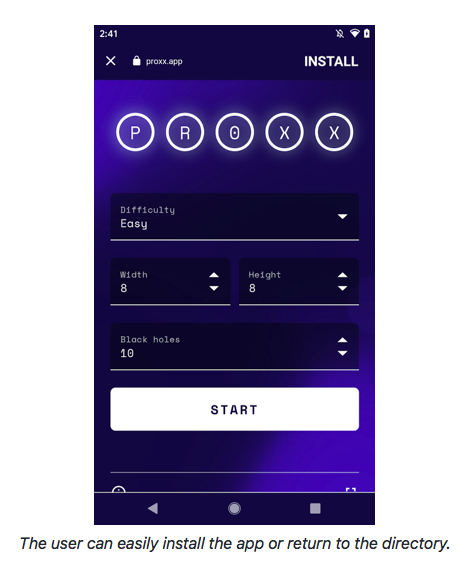
10.3. Web App / Native App Feature Parity
For the web to truly provide effective competition to native App Stores the browsers need access to various system APIs to be able to provide feature parity.
For chat and social applications:
- Screen Wakelock
- Push Notifications and Unread Count badging
- Stable (non buggy) webRTC
For applications that need to communicate with users devices:
- Web Bluetooth
- Web USB
- Web MIDI
- Web Serial
For gaming and other graphic intensive applications:
- Fullscreen API for <canvas> and non-<video> elements
- WASM Threads, Shared Array Buffers, and SIMD
- WebXR
- Offscreen Canvas
- WebGPU (arriving in other engines this year)
10.3.1. Integrated Web App Permissions
Finally to make the experience truly equivalent and to enable users to sensibly manage security and permissions, users need per an installed Web App permissioning built into the operating system. Permissions that are exclusive to browsers (i.e. don’t have an Native App equivalent) can be handled by a webview to the browser that installed the application, alternatively each browser could provide an implementation of this page to the OS.
Example of iOS permission settings screen:
11. Potential Regulatory Solutions
To bring effective competition to both browsers on iOS and to allow Web Apps to effectively compete with the App Store (as Apple has suggested they can), regulation should mandate opening up iOS to true third-party browsers, complete with their own engines.
Further, Apple should be prohibited from enforcing restrictions that would prevent competing engines from delivering Web Apps at feature parity with Native Apps. Regulation should provide for prudent privacy and security considerations to be handled in arbitration should parties not be able to come to speedy agreement.
11.1. Mandating iOS Safari support specific standards is the wrong approach
Web Standards evolve quickly, spurred on by competing browser makers working with developers. This involves collaboration in standards bodies to improve compatibility, however if each Browser vendor had to wait until there was complete agreement between every vendor for each of the various standards (and each standards body operates differently), it would be possible for a vendor (e.g. Apple) to game these processes especially in areas where they have an outsized influence to prevent the progression of these standards.
Typically, cutting edge features are deployed by browser makers in their own engines first, then, using real world feedback over several years, eventual standards are created. No feature starts out as a web standard.
“Web Standards are voluntary. The force that most powerfully compels their adoption is competition, rather than regulation. This is an inherent property of modern browsers. Vendors participate in standards processes not because they need anyone else to tell them what to do, and not because they are somehow subject to the dictates of standards bodies, but rather to learn from developers and find agreement with competitors in a problem space where compatibility returns outsized gains”
No one can predict what web technologies will be important in the future, and disagreements between browser makers on the exact path forward are reasonable and expected. It is very difficult, if not impossible for regulators to predict which standards will be the most important and what their exact definition will end up being. It's a subtle and complex topic.
So rather than (as a regulator) mandating that a gatekeeper must support a particular web standard, a better approach is regulating to enable effective competition on the gatekeepers operating systems both between rival browsers and between Web Apps and Native Apps. Then allow market forces to push forward the changes (new web standards) most beneficial to end users.
11.2. Predicted Response from Apple
Apple on their iOS platform, has a strong incentive to not allow Third Party Browsers or capable Web Apps on iOS as this would:
- Allow open competition with the App Store where Apple currently receives between 15% - 30% of the all revenue.
- It would endanger their 15 billion USD dollar search deal with Google Search (9% of Apple’s 2020 Gross Profit).
- Reduce developer lock-in to Apple’s ecosystem as Web Apps are interoperable with other manufacturers devices and reduce the number of developers that are only exclusively targeting iOS as a platform.
- Reduce user lock-in to their ecosystem as users could migrate with their apps and data to other devices which also supported the apps they use.
This is covered in more detail in this section.
Apple is incentivized to use security and privacy as roadblocks to competition including to block Third Party Browsers, Web Apps and their capabilities. These roadblocks could be spurious and either offer no or exceptionally limited privacy or security benefits to users while depriving them of useful functionality.
When there are privacy or security issues, there could also be mitigations that would allow use of the feature while minimizing any privacy or security issues. Unfortunately due to the highly technical nature of the platform it is possible to present convincing but spurious arguments as a shield to protect against competition, especially if you have a high budget to spend on lobbying. There is a joke doing the rounds of the developer community that Apple has more lobbyists working to prevent competition for the iOS App Store than they have developers working on Safari/Webkit.
“Apple has been able to intimidate and use a lot of money” to kill legislation"
It is expected that Apple will fight hard against these changes as they are likely to dramatically increase competition, affect their Search Engine revenue and curtail their control of the iOS app market, so it is important to break down any argument and separate Apple’s concerns into individual components and address them individually.
11.3. Legitimate Issues
There are legitimate privacy, security, spam, and app quality concerns that gatekeepers will have and these need to be addressed.
The gatekeeper should be able to enforce proportional policies that address these concerns while still enabling open competition between browsers and between proprietary Native Apps and open Web Apps.
11.3.1. Security
Browsers are complex applications, and all browsers have bugs and security vulnerabilities. Not all security vulnerabilities are equal, and many are discovered and patched before they are abused in the wild.
Browsers can be thought of as mini-operating systems, an application platform as well as a tool for browsing the web. They are very powerful and as such need low-level system access and privileges that no other app on iOS currently receives.
It is important to recognize that browsers can be leveraged to gain access to the device by using security flaws. It is likely that all browsers have and will continue to have security vulnerabilities.
Browser Vendors should be committed to maintaining high security in their browsers, reasonable response times for fixing security holes and should continue active maintenance of their browser. If it can be shown that a Browser Vendor is not providing reasonable efforts to keep their browser secure then the gatekeeper should be allowed to either remove privileges from that browser or remove the browser from their platform.
The gatekeeper should either have to apply to the regulator to have a browser removed OR a browser should be able to appeal removal to the regulator.
11.3.2. Privacy
User’s should be able to make decisions and choices which include tradeoffs between security, privacy and utility.
Apple, despite their marketing, arguably does not have the “most” private browser and other browsers could offer more privacy than Safari if they had access to the technology to make that possible. Brave is one example, which is built on top of chromium (blink, the same engine Chrome and Edge use), has extensive privacy features and ad-blocking built in.
Enabling particular functionality may in some cases lead to potentially less privacy but more utility, and it’s important that users are allowed to make these judgements and trade-offs by switching their browser.
11.3.3. Ignoring User Settings / Preferences
The third-party browser might ignore user settings such as parental controls or block lists. It is our opinion that browsers should as much as reasonably possible respect the wishes of the user as expressed through Operating System settings, and that Operating System setting should be available to those browsers through reliable, stable, public APIs.
11.3.4. Ignore certain privacy and security policies
A user may have applied specific privacy and security policies that they would like enforced. A third party browser could choose to ignore these preferences or enact stricter preferences as set via their own settings surfaces.
11.3.5. Abandoned Browsers
A third party browser may be abandoned by it’s developer and no longer updated. This means that the browser would no longer get timely security updates. Operating Systems should be within their rights to disable or remove such browsers from wide circulation to protect users.
Regulators should provide enforcement oversight of these mechanisms to ensure they are not abused by Gatekeepers.
11.3.6. Low Effort Spam Browser
A company could simply package up another browser engine, add functionality to spam users or collect private data.
Note:
Windows, macOS, Android and Linux already allow Third Party Browsers and Web Apps. Note that Android has yet to make it easy for third-party browsers to deploy Web Apps properly (specifically because the interface to mint WebAPK’s are private APIs and are not exposed to competitors).
11.4. Balancing the need for competition with Security/Privacy
The way to address each of these issues is for the Gatekeeper to mandate browser engine choice, open access to private APIs, and require publicly publish extensive documentation for the responsibilities of the Third Party Browsers with regards to security and privacy.
All rules must be narrow in scope and based on the expectations set by the Gatekeeper’s own Browser or Applications.
Third Party Browsers that do not abide by these rules can be removed, with appeals to regulatory oversight mechanisms set forth publicly by competent authorities.
Please note that the authors are software experts not lawyers. We simply want to convey the intent, structure and content of potential regulation.
11.5. Regulation
In all aspects of regulatory oversight, we envision that regulators continue to be involved deeply in the enforcement of rules that accompany findings of fact from these enquiries. Such oversight might create mechanisms of appeal for competitors, hands-on regulatory intervention in day-to-day rule-change proposals by Gatekeepers, or mechanisms for statutory relief. We don’t presume to know the correct mix of these remedies, but the goals of enforcement are more clear.
Gatekeepers should:
Not block the installation of Third Party Browsers
Not prevent or restrict Third Party Browsers from their choice of a Javascript Engine (for example Nitro, V8) or Layout Engine (for example Blink, Gecko, Webkit)2
Not block updates to Third Party Browsers
Allow Third Party Browsers to install and manage Web Apps
Not limit the capabilities of Third Party Browsers and Web Apps and should provide access to relevant device and operating system APIs. Browsers and Web Apps should not be restricted by the operating system from accessing any feature that is provided to the gatekeepers own browser, native apps or system apps.
Provide users with equivalent ability to manage Web Apps through system settings provided for Native Apps, regardless of which Browser installed them.
Provide an easy to use mechanism for users to set their desired default browser and should respect this choice in the operating system and their own applications
Limitations on Third Party Browsers
- The Gatekeeper can mandate and publish narrow scope and proportional security/privacy policies for Third Party Browsers and Web Apps with regulator approval.
- All restrictions relating to Third Party Browsers and Web Apps including those for security and privacy must be individually approved by the regulator.
- All restrictions placed on Third Party Browsers must be publicly documented. Confidential or Secret restrictions should be prohibited.
- Proposed changes to these policies must be published and approved by the regulator.
- These policies must be in the interest of the end user.
- These policies can not inhibit capabilities of the Third Party Browser or Web App from the perspective of the end user.
- The Gatekeeper must produce documentation for these policies which:
- are thorough;
- contain a high level of technical detail explaining both the need for these policies and exactly what they mean.
- These policies and their associated documentation must be made public. Confidential or secret restrictions should be prohibited.
- The Gatekeeper must answer all questions and hypotheticals about these policies in a timely fashion. These questions and answers must be made public.
Providing that the Third Party Browser or Web App latest version is in compliance with the current privacy/security policies the Gatekeeper should not block installation/capabilities or update of it, including if arbitration or litigation is currently in process. The Gatekeeper may apply to the regulator to permanently ban a particular company from providing Third Party Browser or Web Apps if they can prove the Third Party Browser is maliciously acting against the interests of end users (i.e it is actually malware/spam).
The desired outcome with these regulations is that browsers and web-apps are delivered unrestricted by the operating system.
These proposed regulations should be subject to an open comment period to allow all stakeholders to provide feedback, however it should be expected that Apple and other special interest groups are heavily incentivized to maintain the status quo.
2 A browser engine (also known as a layout engine or rendering engine) is a core software component of every major web browser. The primary job of a browser engine is to transform HTML documents and other resources of a web page into an interactive visual representation on a user's device.
12. Bright Future for Competition
If third party browsers were allowed, with full access to all the APIs that Apple gives Safari, this would provide Apple the incentive to keep pace with the other browsers and give consumers a means of voting with their feet by moving to a competing browser if they fail to do so.
It would provide a source of competition with the App Store as Tim Cook and others at Apple have suggested. It would place downward pressure on the tax Apple charges companies and by extension users on all purchases made in the App Store.
If Apple was compelled to provide Web Apps an equal footing to Native Apps, companies would be able to develop a wide range of apps for a single standards based platform that would then be interoperable between iOS, macOS, Android, Windows and Linux. This would result in as much as a 2-5 fold drop in development and maintenance cost and result in higher quality Apps for end users.
A ban on third-party browsers benefits Apple and harms users, developers and businesses.
Competition not walled gardens leads to the best outcomes.
13. Further Reading
13.1. Alex Russell - Browser Choice Must Matter
Alex Russell (Former W3C TAG / Google Chrome, Now on the Microsoft Edge team) has written a series of articles labelled “Browser Choice Must Matter” which go into deep technical detail in relation to “Browser Choice”.
Progress Delayed is Progress Denied
A detailed look into Safari on iOS and how it has slipped behind.
Hobson’s Browser
How Apple, Facebook and Google are undermining user choice in browsers.
iOS Engine Choice in Depth
A deep dive into browser choice on iOS with technical details.
13.2. Bruce Lawson
Bruce Lawson presentation to the UK’s Competition and Markets Authority about issues with Web Apps on iOS.
13.3. Stuart Langridge
Browser choice on Apple's iOS: privacy and security aspects
Stuart Langridge’s presentation to the UK’s Competition and Markets Authority about various privacy and security aspects on iOS.
14. References
Thomas Claburn - The Register - On Safari Underfunding
The Ultimate How-to: Build a Bluetooth Swift App With Hardware in 20 Minutes
Matthew Ball - On Apple inhibiting the future Internet
Apple claiming PWAs represent a viable distribution alternative to the App Store[PDF, 3Mb]
Scott Gilbertson - On Safari being the new IE
Dieter Bohn and Tom Warren - The Verge - Talking about Apple Browser Ban
Niels Leenheer - HTML5test - On iOS Safari holding back the web
Chris Coyier - CSS-TRICKS - On the Apple Browser Ban
Richard MacManus - The New Stack - On the Apple Browser Ban holding back the web
The Verge - Emails from the Epic vs Apple trial
Steve Jobs - Original Announcement of iOS Web Apps
Bruce Lawson - Talk to the CMA about Web Apps
Apple/Webkit - rejecting request to add BeforeInstallPromptEvent
Chromium Ticket on Open WebAPK minting server for third-party browsers
Misha Ketchell - The Conversation - On Dark Patterns
Alex Russell - Program Manager on Microsoft Edge - [ On Safari Webkit lagging behind
Can I Use - Website with data comparing features of different browsers
Mozilla Developer Network Web Developer Needs Assessment 2020 Survey
State of CSS survey - Raw Answers Text
The Register - On Safari breaking indexedDB
Russell Brandom - The Verge - On Apple holding PWAs back
Benedict Evans - Technology Writer - On Apples arbitrary application of App Store rules
Alex Russell - Program Manager on Microsoft Edge - On Apple saving ram by banning other browsers
Benedict Evans - Technology Writer - On iOS Free to Play Games
Mihovil Grguric - CEO of Udonis Inc (A mobile apps marketing agency) - On free-to-play Whales
Tom Perry - Httptoolkit - On Safari not implementing features with no potential security/privacy - issues
Sean Hollister - The Verge - On Apple inability to spot obvious scams in the iOS App Store
Gordon Kelly - Forbes - On scams and clones on the iOS App Store
Dr Michael Grenfell - On Effective Competition
Entrepreneurship Life - Apple users spend more than Android users
Times on India - Apple users spend more than Android users
Professor Douglas J. Leith - On Brave Privacy
A Feature added to Chromium that Edge and other browsers use but Chrome does not
Benedict Evans - Technology Writer - On iOS App Store
Dieter Bohn - The Verge - On Apples Capricious App Store policies
Sean Hollister - The Verge - On Apples effective ban on streamed games
Sean Hollister - The Verge - On Apple copying then banning a keyboard App
Samantha John - CEO Hopscotch - On iOS App Store Review Policies
Kosta Eleftheriou - On iOS Malware
Slipping Past the Review - Malware in iOS Native Apps
Campbell Kwan - ZDNet - On Apples indefinite ban of Epic
John Brownlee - Cult of Mac - On Apple banning Sweatshop Labour Rights Game
Niels Leenheer - HTML5test - On Apple Webkits banning of web device APIs on privacy grounds
Niels Leenheer - HTML5test - On why web device APIs are really bad at fingerprinting
On malicious tracking of users using iOS Native Apps bluetooth
Cor Doctorow - Former European director of the Electronic Frontier Foundation - On Apple's stance on privacy
Geoffrey Fowler And Tatum Hunter - Washington Post - iPhone Tracking
Alex Russell - Program Manager on Microsoft Edge - On IAB and Browser Choice
John Koetsier - Forbes - On Apple secretly buying advertising for other companies
Mac Rumors - On Apple's 2021 1st half profit
Austin Carr - Bloomberg - On Apple's 30% Gatekeeper fee
Russell Brandom - The Verge - On Apple iMessage
Apple Scoop - On why the Mac OS Store is not successful
Alex Russell - Program Manager on Microsoft Edge - On WebStandards
Apple received 9% of Gross Profit from Google Search Engine deal
Rep. Regina Cobb - A Republican state lawmaker in Arizona - On Apple’s aggressive lobbying
Joshua Long - Apple’s Poor Patching Policies Potentially Make Users’ Security and Privacy Precarious
Charlie Warzel - New York Times on privacy and native apps tracking
Sara Morrison - VOX on harvesting data via native apps
Bennett Cyphers - Electronic Freedom Foundation - On harvesting data via native apps